How to fix a noisy MacBook Pro fan
My three year-old MacBook Pro recently started emitting a constant racket from its left fan (which sounds something like this). Most people will tell you you need a new fan for $50, but I decided to try to fix it instead, and so far (it’s been two weeks nine months), the repair has worked great. As any google or youtube search for “noisy macbook pro fan” produces thousands of results, I hope this saves someone fifty of their hard-earned bucks during this, the winter of our hardships.
You’ll need a couple of tools to perform this operation, but you would need these same tools to install a replacement fan as well, so you’re still saving fifty bucks (or more, if you were going to take it in to be repaired). They should total up to less than $15:
You also might want to get some compressed air to clean out the dusty innards of your machine (I added one to my order just to make it to the $25 free shipping mark at Amazon, and it ended up being quite handy).
As reported in the comments below, this repair works on both 15″ and 17″ versions, going back to 2006 and including the newer “unibody” models (unibody disassembly instructions are slightly different, but the repair requires the exact same set of tools). UPDATE: the new MacBook Pros introduced in April 2010 drop the Torx screws for Triwing screws; you’ll need a Triwing screwdriver to complete the repair.

The first step is to disassemble the laptop, for which you’ll need the aforementioned T6 Torx and Phillips screwdriver; it’s best to print and follow these instructions. This undertaking is categorized by iFixit as “difficult” — and while I would downgrade that rating to “easy if you’re coordinated,” you may want to go a different route if you’re not comfortable with the idea of your laptop looking like the one at left.
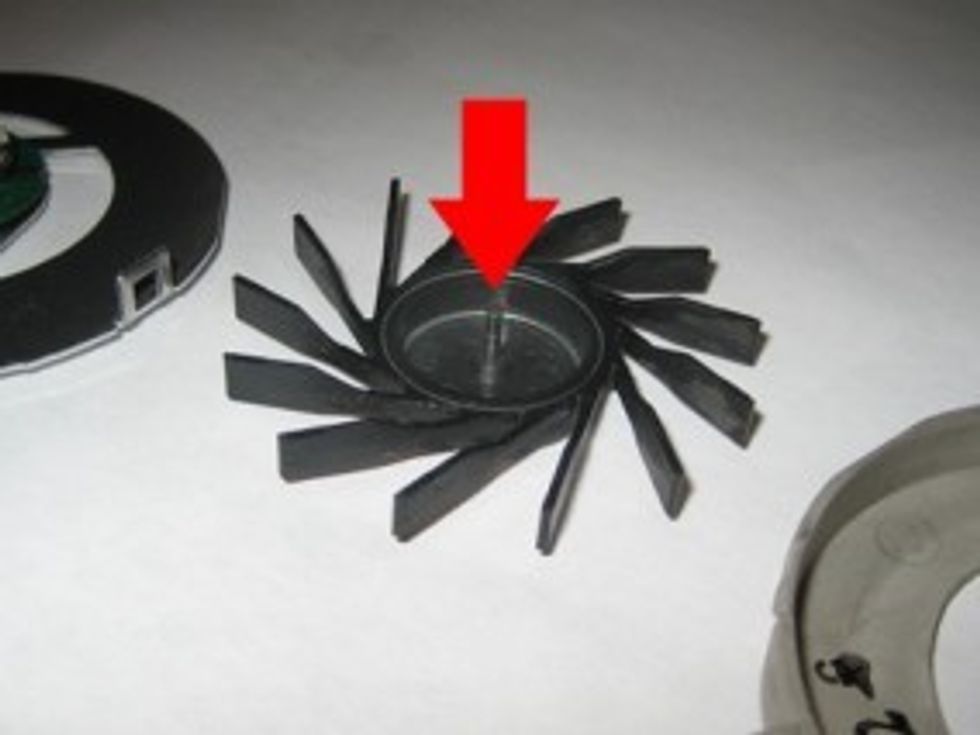
After you’ve extracted the fan from the Mac’s innards, the fan assembly comes apart quite easily (by undoing two Phillips screws), into three pieces. The inside of the fan assembly (illustrated in the brilliant photo below) is the noise culprit — it just needs to be cleaned and lubed.
Get rid of any debris using a lint-free cloth. Then, apply some some WD-40 to the axle (illustrated by the subtle red arrow). I applied a bit to the axle, reassembled the fan, and everything went back together, quietly.
After reassembling the laptop (follow the directions in reverse), use the app smcFanControl to ramp up your fans to full speed for 30 seconds or so, and when you drop them back down to normal RPMs, the lubricant should have set. The Mac once again operates as it should, silently. Problem solved!

Related Posts
No related posts.
191 COMMENTS
-
-
-
This is good info and was one of the top hits when I was looking for info on the fan noise my 17″ Macbook Pro was making.
The only thing I’d suggest is to NOT use WD40 which is mainly kerosene and a small amount of mineral oil. WD40 was designed as a water displacer and not a high speed lubricant. The next best thing around the house would be sewing machine oil or 3in1 oil which is vegetable based but still better than WD40.
Anyway, thanks for the tip. My fans are quiet and clean now that they’ve been vacuumed, dusted and lubed.
-
used sewing machine oil. tons of gunk and fur in the area near the fan, pulled off a clot where it exhausts
worked perfectly afterwards, very happy now , was sure i would be buying a new macbookpro cause the noise was so grating.
thanks -
Just did this to my Unibody Macbook Pro and the noise is completely gone! Fantastic fix as I had all the tools and lube at the house.
-
kane on 02.13.11 @ 6:02PM
Yeah I too agree.. The fan noise was driving me crazy. Now nothing!!
Glad that I came across this website :)
-
-
Bala Dada on 01.6.11 @ 1:27PM
WONDERFUL!! it worked like a charm. I used a bit of light grease as lube
-
-
Arno on 01.14.11 @ 2:26PM
I found I did not have to take the fan out, just undid the 2 phillips screws, sliced the black tape holding the fan cover to the exhaust vent, and pulled it out. A dab of Vaseline and good to go. (also evicted the dust bunnies). Spooky quiet now. :-)
Thank-you SOoooo Much!!! for the tip.
-
Tucker on 01.24.11 @ 11:26AM
Another VERY effective lubricant to use for the fans (I use it in commercial public-safety radio power supplies) is silicon “o-ring” lubricant. It is commonly available at auto repair stores, and is extremely durable as well.
-
Macduzzit on 01.31.11 @ 5:42AM
Good Technology! I have a basketcase Macbook purchased from eBay (when I still HAD faith in their services) so it was an easy fix. I used silicone spray lube in the place of WD40 since I already had it on hand and use it most often. So far so great! The SMC FanControl is the SHIZZITS as well. Thanks a heap!
-
-
Raphael on 02.4.11 @ 9:13AM
OMG, i love you man !!!! … worked like a charm and quite like, … don’t even have a comparison! ^^
you ARE AWESOME !!! Thanks for the tutorial !! :-) -
Stevie on 02.12.11 @ 6:40PM
Cleaned both. 1 is totally silent now the other one is still not cured.
BE CAREFUL the blades of the fans are easy to break while taking them apart.
I broke one blade of the fan – sh* – surprisingly this is not the one which is still noisy.good luck!
-
RIck O. on 02.14.11 @ 1:44PM
My 2007 MacBook Pro had same problem. Left fan sounding like it was coming apart. Put up with it for over a year. Tried ramping up speed, dropping speed, over and over. Best I could get was a short few day fix.
Finally, dawned on me, ‘Duh! I have AppleCare!’
I took it to the close by Apple Store. They took apart my machine, installed a new fan and returned it to me next day . Works great! Cost? NOTHING! Yea, AppleCare!
-
rups on 03.7.11 @ 10:31PM
well.. Applecare is $349 for 2 years (1 year is covered by the warranty in the US). So you paid quite a lot for them to spray your fan.
In Europe Applecare is even less neccessary, as warranty on elecronic devices has to be minimum 2 years by law. My MBP Logic Board died (SantaRosa) just before these 2 years and Apple changed it for free. I did not have AppleCare.
-
-
I can’t explain how thankful I am to you for posting this! My 5year old MacBook pro was doing the same thing. At the apple store they basically told me it was time for a new computer (can’t blame em… It probably is, but till I can afford that it really isn’t an option. Lol)
My boyfriend got tired of me cussing out my laptop and even hitting it sometimes (don’t judge… I know it’s not very smart… But I was going a little crazy with the sound and it causing my computer to freeze up constantly while I tried to work… And somehow hitting it would actually stop the sound and unlock it…at least for a minute). So he googles the problem and found your post.
I’m not the most electronically savvy gal out there, but I was able to operate on my computer as directed just fine. And the sound has completely stopped now!!!!!!!! Thankyouthankyouthankyou!!!
Amanda
-
rups on 03.12.11 @ 8:02PM
Amanda, I think you shouldn’t be afraid to blame them. I don’t know why people always justifies Apple. They are to blame. Your computer is fine, it only needs a $30 piece. Time for a new computer? My *ss.
-
-
Nathan Davis on 02.17.11 @ 2:58PM
Just did this with my 2007 Macbook pro A1211 and worked like a charm! Amazing! Left fan was a little trickier than the right. Went to iFixit for the complete guide but instead of disconnecting everything I pried enough apart to just spayed some WD40 in the fan well but now wish I would have taken it apart completely cause I can hear no noise from the right but still a little from the left (nothing even close to what it was though). Good tip!
-
Robert Segal on 02.25.11 @ 1:09PM
So good! Worked just as described. Not that hard. Totally fixed the problem!
One thing, I jus assumed it was the left fan, since that’s what the instructions talked about, and I did the left fan and put everything back together, only then to realize that it was actually the right fan. So take a close listen before you get started and make sure you do the correct fan. Course, can’t hurt to do both, but it was a pain because I put it all back together before I realized. There’s an instruction for the right fan on iFixit as well.
-
Mozza on 02.27.11 @ 12:51AM
I came here through Google because the right fan had become noisy all of a sudden on my MacBook Pro C2D 2006. I followed your instructions plus this video (http://www.youtube.com/watch?v=apn3j3mAR1k) to remove the fan and now my laptop is quiet as it was a few days ago. The only difference is that I used ceramic wet lube, meant for bike chains. Most of all, you saved me a trip to the Apple Store and days or weeks without my computer. Thanks a lot.
-
Great tip, just did it the way you described and, you guessed it, it totally worked. Thank you very much, you just saved me some money. Plus I finally got myself those screwdrivers. :)
-
-
-
rups on 03.7.11 @ 10:16PM
hey! nice guide. 100% worked for me!
I not only fixed the rattling left fan, but cleaned the whole insides of the computer with the compressed air, and I’d say the cooling is noticeably more efficient now. I’m having average temps of 65C, while I usually had averages around 75C.
The fan blades were totally full of s**t. I don’t remember the computer as silent as is now.
I recommend anyone with a 3+ y.o. laptop to do a general cleaning.
-
rups on 03.12.11 @ 8:11PM
two days afer the fan started rattling again.
I redid the fix, but this time I used a drop of oil from my car (5W30).
Now its been running smoothly for weeks.
So-beware of the lubricant you use. It’s important it’s a high speed lubricant. Others will dry in no time.
-
-
Nick on 03.14.11 @ 8:28PM
You sir, deserve a pulitzer prize or something for this article. So far, this is working beautifully, and frankly, I am amazed. Thank you, from the bottom of my heart.
-
The noise was really annoying for the past few days on my 3+ macbook pro. This works 100% it is so quite now. Thank you for such a wonderful post.
-
Mihai on 03.24.11 @ 11:47AM
This is great! I’ve managed to clean my fans and the weird helicopter sound that the fans were making at over 3500 rpm is gone. Thank you!
-


8 pingbacks


This is so weird… I can’t hear my laptop at all.
Now how I am supposed to know it’s still living? Same thing happened with Ole’ Pappy…