How to fix a noisy MacBook Pro fan
My three year-old MacBook Pro recently started emitting a constant racket from its left fan (which sounds something like this). Most people will tell you you need a new fan for $50, but I decided to try to fix it instead, and so far (it’s been two weeks nine months), the repair has worked great. As any google or youtube search for “noisy macbook pro fan” produces thousands of results, I hope this saves someone fifty of their hard-earned bucks.
You’ll need a couple of tools to perform this operation, but you would need these same tools to install a replacement fan as well, so you’re still saving fifty bucks (or more, if you were going to take it in to be repaired). They should total up to less than $15:
You also might want to get some compressed air to clean out the dusty innards of your machine (I added one to my order just to make it to the $25 free shipping mark at Amazon, and it ended up being quite handy).
As reported in the comments below, this repair works on both 15″ and 17″ versions, going back to 2006 and including the newer “unibody” models (unibody disassembly instructions are slightly different, but the repair requires the exact same set of tools). UPDATE: the new MacBook Pros introduced in April 2010 drop the Torx screws for Triwing screws; you’ll need a Triwing screwdriver to complete the repair.

The first step is to disassemble the laptop, for which you’ll need the aforementioned T6 Torx and Phillips screwdriver; it’s best to print and follow these instructions. This undertaking is categorized by iFixit as “difficult” — and while I would downgrade that rating to “easy if you’re coordinated,” you may want to go a different route if you’re not comfortable with the idea of your laptop looking like the one at left.
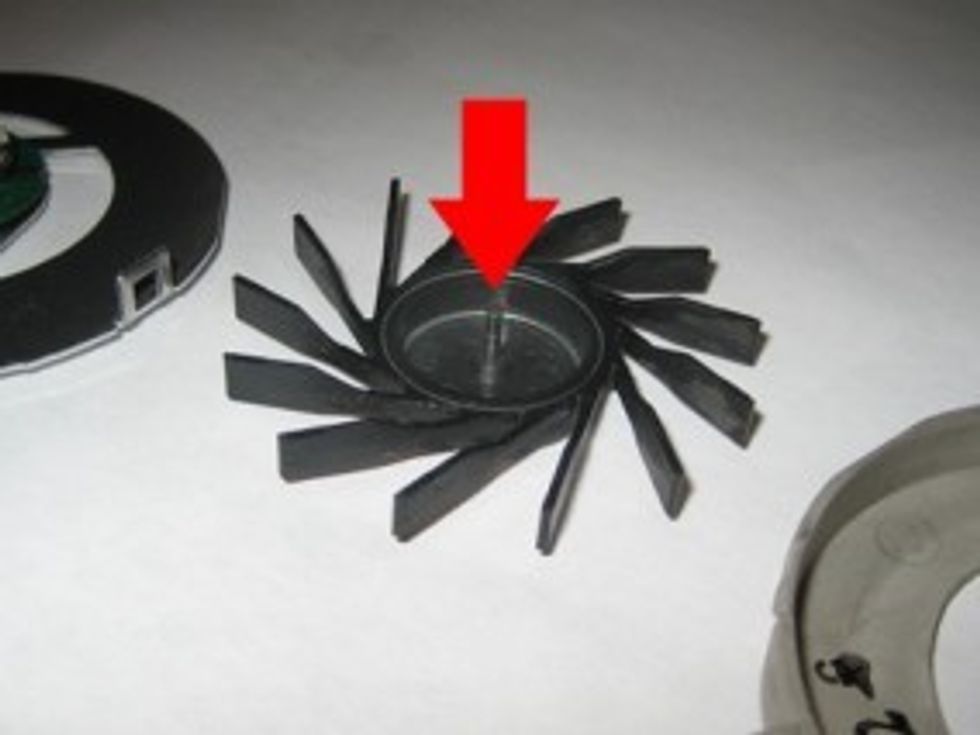
After you’ve extracted the fan from the Mac’s innards, the fan assembly comes apart quite easily (by undoing two Phillips screws), into three pieces. The inside of the fan assembly (illustrated in the brilliant photo below) is the noise culprit — it just needs to be cleaned and lubed.
Get rid of any debris using a lint-free cloth. Then, apply some some WD-40 to the axle (illustrated by the subtle red arrow). I applied a bit to the axle, reassembled the fan, and everything went back together, quietly.
After reassembling the laptop (follow the directions in reverse), use the app smcFanControl to ramp up your fans to full speed for 30 seconds or so, and when you drop them back down to normal RPMs, the lubricant should have set. The Mac once again operates as it should, silently. Problem solved!

Related Posts
No related posts.
265 COMMENTS
-
jeremy on 01.10.13 @ 5:48PM
Excellent post. My 2009 MacBook Pro was screaming like a banshee, but after a pretty easy 15 min. repair, it’s as quiet as the day I bought it. I used PTFE lubricant instead of WD-40. Thank you.
-
Jeremy Heslop on 01.11.13 @ 6:58PM
My 17″ Mbp had been doing the same thing thanks to the kids. Took it apart and blew it out without wd40 and it started doing it within a few hours. So I took it apart again and this time put wd40 on the fan post. Works great now!
-
-
-
-
WD40 is not a lubricant. (google that) You should use a very small amount of some grease or teflon if you have it — I mean REALLY small — on that post. Bike shops have some good stuff. You can clean it with WD40 first, but then actual lubricant will make this repair last much longer.
cheers,
dug -
-
Thank you for this post Ryan! Luckily I hadn’t spent a lot of time searching for a solution before I stumbled across your lovely fix! Had watch a “painful” video done by some kid that didn’t even say how to fix the problem. (least I don’t think so…couldn’t bare the kiddy jokes him getting sidetracked)
But this solution is simple and easy…and I agree the dis-assembly of the macbook pro should be rated easy, especially if you ever dealt with a laptop before. I had the tools on hand and had it fixed in less than 30 mins. Can’t thank you enough, definitely saved me time and money. (and my sanity :-), the noise was driving me nuts)
-
Very useful post, and link to step-by-step instructions.
I had a very noisy fan and so pulled my macbook apart and cleaned dust out. However, when I put back together, the fan didn’t work at all!!
Started looking at buying a replacement, then had an idea. Took it apart again, and this time I put a small amount of HAIR CLIPPER OIL on the fan’s axel!!
Put it all back together and now have a perfectly functioning, quiet fan again! -
Great post and simple fix. Agree that there are better lubes than WD40. Hey how about a book on “Preventative Maintenance for your Mac”… my fan spindle is pitted and will have to replace (both) fans but had I been aware of this issue a year ago, some lube and 30 minutes could have avoided the replacement for who knows how many years to come. Thanks!
-
Rich on 03.29.13 @ 9:58AM
My Macbook Pro 17 had been making a hell of a racket, luckily I found this and within a half an hour the problem was solved, I didn’t even need the special torx screwdriver, I used a watchmaker’s 1.4mm flathead and it worked perfectly. I chickened out with the left fan as that would have meant removing the charging unit and probably even more stuff, but it was the right one that was making the noise, and once I’d removed it I saw that the filter was blocked with dust and stuff so got rid of that and everything is running fine now. Thanks for posting this, it really is easy, if not a bit fiddly with all the tiny screws! Cheers!!
-
Bernie on 04.7.13 @ 5:43PM
This procedure works for the Samsung NP-SF410 fan assembly as well. Thanks for the tutorial. It was GREAT!
-
Visionscaper on 04.20.13 @ 2:28PM
The WD-40 did the trick for the fans on my Mac Book Pro Late 2008, no more squeaking noise. Thanks for the tip!
-
sarmenhb on 04.21.13 @ 3:35PM
Thank you!! I looked up the price and it was going for $50 huge ripoff it didnt even cross my mind to try and fix the fan now i have to go buy wd-40 im out lol.
-
“easy if you’re coordinated.” You’re right about that, Ryan! I’m actually among those people who want to do the repair themselves and just buy some macbook replacement parts. Knowing which repair is easy or difficult actually depends on the person since this skill can be relative. And by the way, thanks for this guide!


8 pingbacks


Dear Ryan,
could you please, please do the same tutorial on MacBook White 13″?
I got so discouraged when googling it, it seems that prying open MacBook 13″ is 10 times more complicated that doing that on MacBook Pro. I need to salvage my MacBook… it sounds sometimes like a lawn-mower, sometimes like Mongolian throat singing, crazy. Thank youu, and you help is so very much appreciated :)