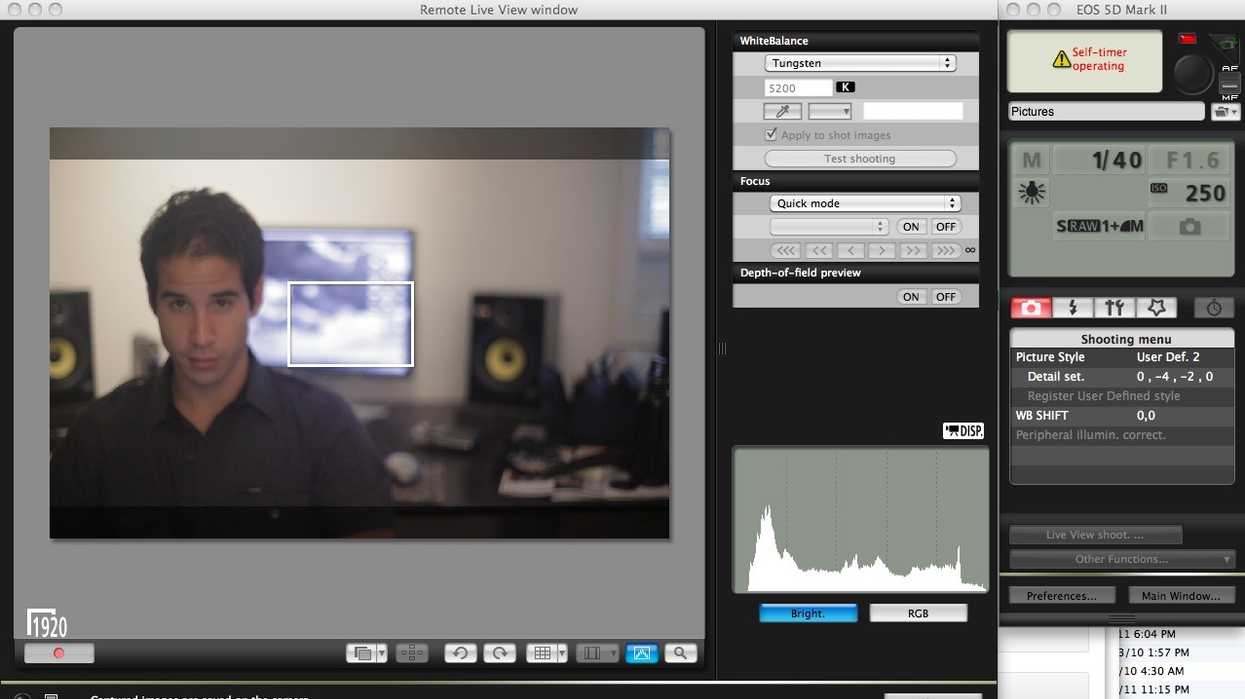
I've been doing a number of interviews and filming self-shot videos as part of my attempt to make my first feature film. I've used a number of external monitors with my 5D Mark II in the past but I don't actually own one myself, so I haven't been able to see the rear LCD while I'm standing in front of the camera. But as I was shooting an interview with NextWaveDV's Tony Reale today, he mentioned that I could use the free bundled EOS Utility software to monitor the camera's output over USB with my laptop. As the author of The DSLR Cinematography Guide, it seems stupid that I didn't know this, but I'd either forgotten (very possible, as my brain is quite frazzled these days running the campaign) or I'd never tried it in the first place. It's the cheapest way to get an external monitor (since it costs nothing):
Yes, EOS Utility even gives you live RGB histograms and focusing control (if you have autofocus lenses -- which I don't). I'd thought of the program in the past as something to be used for shooting stills, but can start and stop recording movies, change white balance, and zoom in to 100% as a focusing aid. Note that you will need your original Canon CD-ROM to install EOS Utility -- while you can get the latest upgrade to the software (for Mac, for Windows), Canon will not to my knowledge let you install these downloads from scratch (which seems unecessarily restrictive -- I mean, we have the Canon camera itself, who cares about the original CD?). When you start up EOS Utility, click on "Camera settings/remote shooting" as seen here:

Then, in the control panel that pops up, click on "Live View shoot." And there you are, free USB monitor! While the refresh rate is not real-time, it's definitely good enough for shooting interviews. And one of the best things about this is that unlike with an HDMI external monitor, the rear LCD stays active. I think I knew about this at one point, but I'd forgotten. Did you guys know about this?
[via NextWaveDV]
- How to Control Your Sony Alpha Camera with an Apple Watch | No Film School ›
- A Brilliant New Contender Joins the High-Bright Monitor Game ›
- Portkeys' New On-Camera Touchscreen Monitor Makes 3D LUT Monitoring Easy | No Film School ›
- The Portkeys LS7P is Another Highly-Capable On-Camera Monitor With Wireless Camera Control Capabilities | No Film School ›
- Is This the Best Client and Sidekick Professional Monitor for Video Editors? | No Film School ›
- 6G and 12G Quad Mode Are Coming to Your Flanders Scientific XMP Monitors | No Film School ›
- Did Hollyland Just Kill Traditional Camera Monitors With Its New Vcore Smartphone System? | No Film School ›
- Better Compose Your Shots With This Large Color-Accurate Production Monitor ›