Video Editors, How Do You Manage Disk Space? One Neat Solution: DaisyDisk
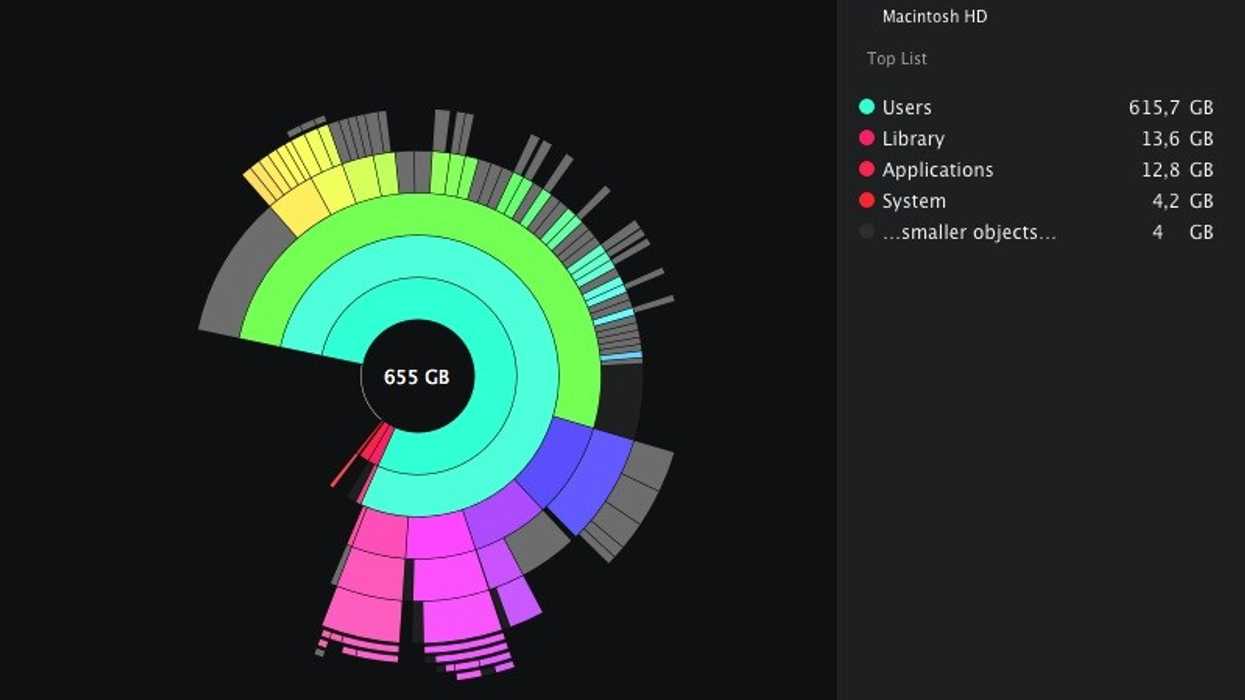
Video takes up a lot of hard drive space. HD video more so than SD, 4K more than HD… and since the flooding in Thailand, hard drive prices have spiked precipitously. So there’s always room in an editor’s toolkit for an app to analyze drive space and zero in on the largest directories to delete or move. Similar to my approach to tracking time, freeing up space is all about focusing on what’s important: in this case, the largest files. DaisyDisk is a paid Mac app that I find myself using frequently; here’s a review from NextUpMac (and a free alternative).
Normally $20, DaisyDisk has been $10 for quite some time. The visual interface really works, in my experience: it’s not just for show. However, if you think $10 is too much to pay, check out a free alternative on the Mac: OmniDiskSweeper. Windows users, any suggestions for managing disk space?

Link: DaisyDisk – Mac App Store
Related Posts
- Which is Better for Noise Reduction, Neat Video or Magic Bullet Denoiser?
- The Latest OS X Lion Hackintosh Recommendations for Video Editors
- Prescreen and FilmDIY are New Players in the Independent Digital Distribution Space
39 COMMENTS
-
-
I love DaisyDisk, but I also wanted to second this – as a new FCPX user, I had no idea deleting the render files could clear up GB of space. Heck I didn’t even know FCP was storing those after I closed the project. “Project View > File > Delete Project Render Files” is your friend.
-
-
Hi, I’ve got a suggestion for Windows. WinDirStat does the job, but with Avid Media Composer, which I use, I rarely need it for video work – the Media Tool in Avid gets the job done.
-
chris on 01.18.12 @ 11:29AM
Love windirstat, just tried it out. This hdd is dominated by .cfa files, way more than I’m comfortable with. What’s the policy on deletion? I’ve cleaned temp .cfa’s from Soundbooth but a ton still remain. So much residue from old projects, ugh.
-
Kevin on 01.18.12 @ 6:25PM
I agree this program is one of my essentials for keeping systems in shape.
-
-
And for Linux users, Baobab comes with a lot of distributions, or Filelight for KDE desktops.
-
maghoxfr on 01.18.12 @ 11:20AM
Hi, what NLE do you use in Linux. I really want to migrate wholly (I already have for audio production).
-
guto novo on 01.18.12 @ 1:02PM
If you want to go 100% linux, be aware that you may have to pay some good money for some good apps for an easy time as na end user.
If not, if you like to fine tune an app, sometimes to compile stuff, to go deeper into codecs´ use, etc, open source/free software may be great for you.
Into open source apps, the best choice is:
Cinelerra for editing and some color work. It´s a beast, works with very high-res footage. BUT it´s alien software, takes time to get used to it, and it may frustrate some end users.
Here you can learn how it´s not easy to set up cinelerra, but after you tune it, it works perfect, if not it will crash a lot! crazedmuleproductions.blogspot.com/Blender 3D for both 3D stuff and also for greenscreen, motion tracking, as good as after effects for color grading, etc… blender is a powerful beast, but again, the learning curve is not easy for some.
ww.blender.org/features-gallery/features/For vector graphics there is inkscape and xara xl (the same code corel used for corel xara), and for bitmap image there is gimp and krita.
Into the commercial app$, the choices are:
Davici resolve for color grading stuff.
Nuke for post-production stuff.
Ant for editing and post-production stuff
of Piranha (cost more than ant but is more than just an app)
both from ifx software ifxsoftware.com/products
There is others, but except for nuke, Houdini, davinci and piranha, these are the apps i´ve used with linux to produce my images for the past 5 yrs.And pardon my bad English! :)
-
maghoxfr on 01.18.12 @ 5:54PM
I never could get the grip of cinelerra. I’m using blender for color correction and green screen and some compositing, but I?m just beggining with it. I love the node editor.
I know that lightworks was going to be available in linux, but I don’t think it already has. Thanks for the answer!
-
-
Azandis on 01.19.12 @ 3:26PM
I’ve used Linux solely for a number of years. Kdenlive is an incredibly powerful and intuitive NLE for free. There is even a Mac-ports project to run it in a MacOS environment.
I recently moved to PP CS5 from Kdenlive and have had no problem making a quick transition, so I assume it would be essentially as easy to make the inverse transition.
I have a pretty burly computer and can handle Canon footage right out of the camera into the timeline. The latest stable version of Kdenlive also allows for proxy clips, so if you’re shooting 4k or just don’t have the Umph in your specs, you can still edit just fine.
Guto has a pretty good list of linux programs, but I’ll add GIMP also. It’s a Photoshop analog and I’ve used it professionally in graphic design work for a number of years.
-
-
-
I’m using TreeSize Free (Windows) for a quick overview. It’s convenient., because it can be integrated in the Explorer’s context menu.
http://www.jam-software.de/treesize_free/-
AWESOME!!!
Thanks Koo for making this post and thanks Ringo for this link. EXACTLY what I have been wanting for years.
:-)
-
-
For Windows, I used to use SequoiaView. It gives a nice rectangular view of your storage. Not sure if it’s still up to the task with the file sizes that are common these days, but I always found it helpful.
http://w3.win.tue.nl/nl/onderzoek/onderzoek_informatica/visualization/sequoiaview/
-
Koitz on 01.18.12 @ 12:37PM
On Windows I’m using “Scanner” (http://www.steffengerlach.de/freeware/) a few years ago, which is very very similar in graphics to DaisyDisk. Sometimes I’ve used “SpaceMonger”, although it’s not free.
In Mac I prefer “Disk Inventory X”, free and with similar lateral bar of DaisyDisk
Byez
-
Rev. Benjamin on 01.18.12 @ 1:09PM
I second the use of Disk Inventory X for mac. Real life saver. Link: http://www.derlien.com/
-
I third Disk Inventory X. Been using it for years, and it’s saved me many times.
-
-
-
What would be most useful for someone like me (with dozens of very similar looking bus-powered USB drives) is a bit of software (Mac based) that makes a registry of everything that’s on the drive when you plug it in… and then retains that info even when the drive is ejected. I’ve got stuff (exports, location shoots, and projects where I’ve been away from the office) that is duplicated across multiple drives – and I’d love to be able to tidy it all up and remove dupes, but unless I can search through lists of files on offline drives it’s too much work and ain’t gonna happen.
Equally, it’d be handy to be able to say ‘which drive is this file on’, and get the results back – without actually having any drives plugged in. Guessing there is Mac software that does this – anyone know what it is???!
-
scalp on 01.18.12 @ 3:29PM
Alex, you could try Tri-Catalog. I used it when we had all archived on CDs-DVDs.
-
-
-
-
For Mac, a fantastic app with a great interface (double bonus: free) is Grand Perspective. It’s easy to use and visually shows what files/folders are huge and need to be delete/moved.
http://grandperspectiv.sourceforge.net/
-
-
-
I use WinDirStat on PCs. When I used to develop software on Silicon Graphics computers, they had an awesome graphical display of disk usage called FSN (pronounced ‘fusion’) that display folders as a city of 3D buildings, with disk size corresponding to height. You might have seen it in use when Alexis was trying to lock the control room door against the raptors in Jurassic Park. I wish someone would port it to Windows/Mac…
-
What a great topic! I am looking for the exact same app as Alex. I would also love to be able to tidy it all up and remove dupes, but unless I can search through lists of files on offline drives it’s too much work and ain’t gonna happen. Tri-Catalog seems very interesting but quite pricey. Scalp how happy are you with this app? Does it perform well and justifies its price? If you find time please let us know….thanks
-
A free program with a very visual user interface for Windows is “HDGraph”. I like it because you can see immediately which folders are taking up the most disk space, then use xplore2 to clean up what you don’t need.
-
I was running out of hard drive space, and finally discovered that because I had Mail set to save my mail locally, it had eaten up an amazing 50 GIGS of hard drive space! It was storing every email, every draft, the trash, the attachments, etc, and duplicates of most things at that! This app may have saved me some headache there, but in addition to deleting renders, Mail is one thing to check on.
-
Disk Inventory X is a free alternative to this on a mac. Works great and has a good interface that shows you every file, but in a really easy to see drawing. Hard to explain. :P
Been using it for 3 years. -
Heiko on 01.20.12 @ 4:24AM
+1 for Disk Inventory X on the Mac and WinDirStat on the PC.
Both of them work very similarly, they show color coded tree graphics and a directory list view with sizes next to each folder. Both of them are free, so why pay for a tool – both of these free solutions do everything you need to get a quick overview over your disk.
-
james on 01.20.12 @ 7:21AM
“How Do You Manage Disk Space?”
manually like a professional because i know my way round the editing software and how it works.
no offence.
-
-
-
TTTulio on 01.23.12 @ 5:36AM
The main space grabber are duplicate files. iPhoto / iTunes are really bad at this.
It doesn’t look like this app scans for duplicates. -
SequoiaView is the best! not quite as pretty as daisydisk, but gives you that amazing graphic of whats large and small on your hard drive at a glance. I used it in forensics before i used it for film!
-
I use Media Indexer to keep track of all my hard drives. It’s easy to use and inexpensive.
-
That looks really nice. Another good app that essentially does the same thing, but offers another way to view that is similar to Finder is WhatSize | http://itunes.apple.com/us/app/whatsize/id413702125?mt=12
It’s been my fave for a couple years now.
2 pingbacks
- Hard drive management for video editors | Jonny Elwyn - Film Editor on 01.26.12 @ 10:45AM
- Video Editors, How Do You Manage Disk Space? One Neat Solution: DaisyDisk « DSLR news blog on 01.28.12 @ 7:24AM


Simply delete Render Files (FCP) or Preview Files (PP) for completed projects. That can usually open up 20-100GB without any complications.