Curious to Explore Apple Immersive Video? Try Out Editing These Sample Clips in DaVinci Resolve
Blackmagic Camera 9.7 Public Beta is here with added support for the URSA Cine Immersive and free sample immersive video clips to try out in DaVinci Resolve.
Blackmagic Camera 9.7
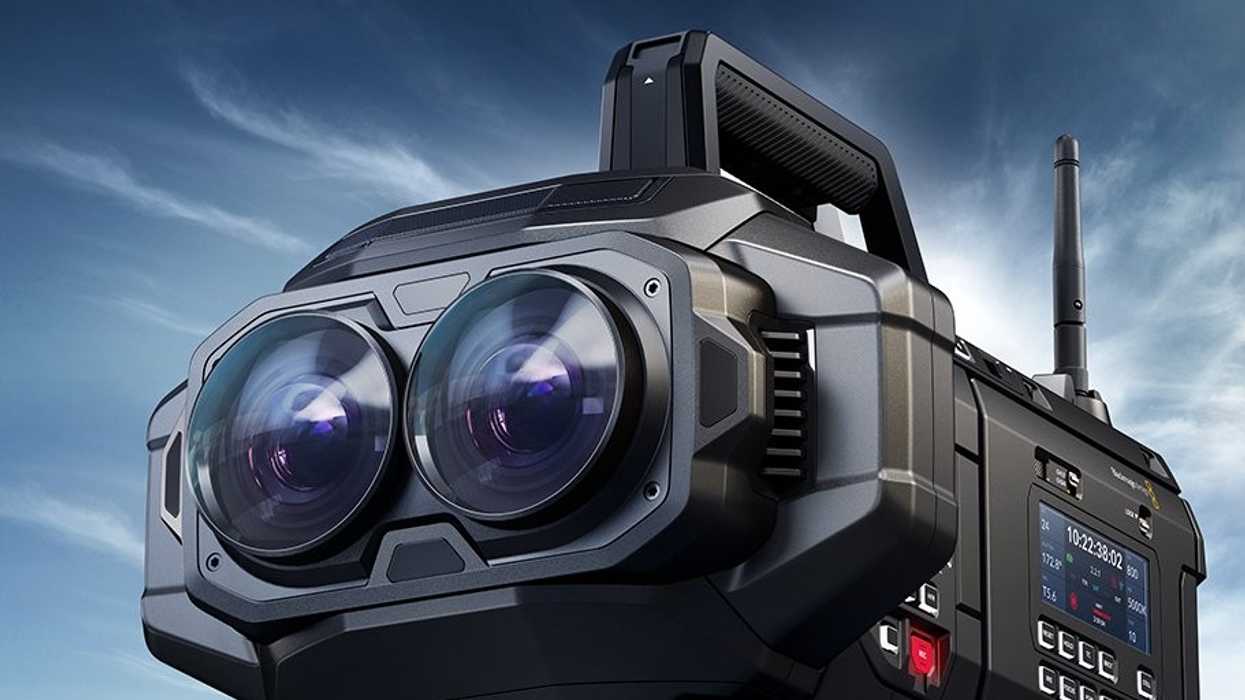
Along with a new update to DaVinci Resolve, Blackmagic is dropping its first sample of immersive video clips, which are free to use and try out in Resolve Studio 20.1 for macOS. Blackmagic Camera 9.7 Public Beta is also getting an update that will be adding new support for the URSA Cine Immersive, the first cinema camera designed to record Apple Immersive video specifically for the Apple Vision Pro.
It’s a bold new world we’re entering with immersive video, and if you’re curious to explore its cutting-edge technology, this is the time and way to try it out.
Here’s everything you need to know about Blackmagic Camera 9.7 Public Beta and these fun, new, sample immersive video clips in Resolve.
Sample Immersive Video Clips in DaVinci Resolve
To kick things off here, if you’d like to try out immersive video clips in DaVinci Resolve, you can try them out now in Resolve Studio 20.1 for macOS. These clips give a nice example of what Apple Immersive video can look and feel like, as well as introduce you to the unique experience of editing these fully immersive file types.
We actually got to check out this immersive video workflow at NAB this year, and trust us when we say it’s pretty insane to experience the full effect of this new format with the Apple Vision Pro itself. For anyone craving new, non-AI technology in the film and video space—this is something worth exploring for sure.
Sample immersive video clips for use in DaVinci Resolve Studio 20.1 for macOS are available to download from http://bmd.link/aAoL73
What’s New in Blackmagic Camera 9.7 Public Beta
As far as Blackmagic Camera Public Beta goes, there are plenty of updates to check out as well, mostly highlighted by new support for Blackmagic RAW immersive video files.
Blackmagic URSA Cine Immersive
- Adds support for Blackmagic RAW Immersive files.
- Adds ‘toggle eyes’ to function button parameters.
- Sets ‘HFR’ button to ‘toggle eyes’ by default.
- Adds Immersive heads up display elements.
- Adds support for dual 8K recording.
- Adds ILPD embedding support.
- Adds 90p project rate support.
- Sets 90p default project rate.
- Adds 30p external locking for 90p.
- Adds 30p external timecode for 90p.
- Adds USB-ethernet into Setup menu.
- Fixed setting record rate to 90p using REST API.
- Fixed Immersive guides resetting on power cycle.
- Fixed ND filter control from Blackmagic Camera app.
- Fixed crash when timeline scrubbing before playback.
- Fixed Immersive Control REST API resetting on power cycle.
You can explore more, download, and install this latest Blackmagic Camera update here.
- Blackmagic Camera App Adds 17K URSA Cine 65 and Remote Control for Cine Models ›
- Blackmagic Shows Off Complete Immersive Video Experience for First Time at NAB 2025 ›
- Blackmagic Shows Off Complete Immersive Video Experience for First Time at NAB 2025 ›
- Blackmagic URSA Cine Immersive Camera Gets Price and Release Date ›
- Blackmagic URSA Cine Immersive Camera Debuts at SXSW 2025 ›
- Is Apple Secretly Working on Launching its Own Immersive Video Camera? ›
- Blackmagic URSA Cine Immersive Camera Revealed by Apple at WWDC 2024 ›
- Study Up on the New Blackmagic URSA Cine Immersive With These Free Filmmaking Guides | No Film School ›
- Master the Art of Apple Immersive Video With These Free (In-Person and Online) Workshops | No Film School ›