It’s Here! You Can Now Start Using Adobe Premiere on iPhone Beginning Today
Curious to try out Adobe Premiere on iPhone, well, good news—it’s live (and free) starting today.
Adobe Premiere on iPhone Release
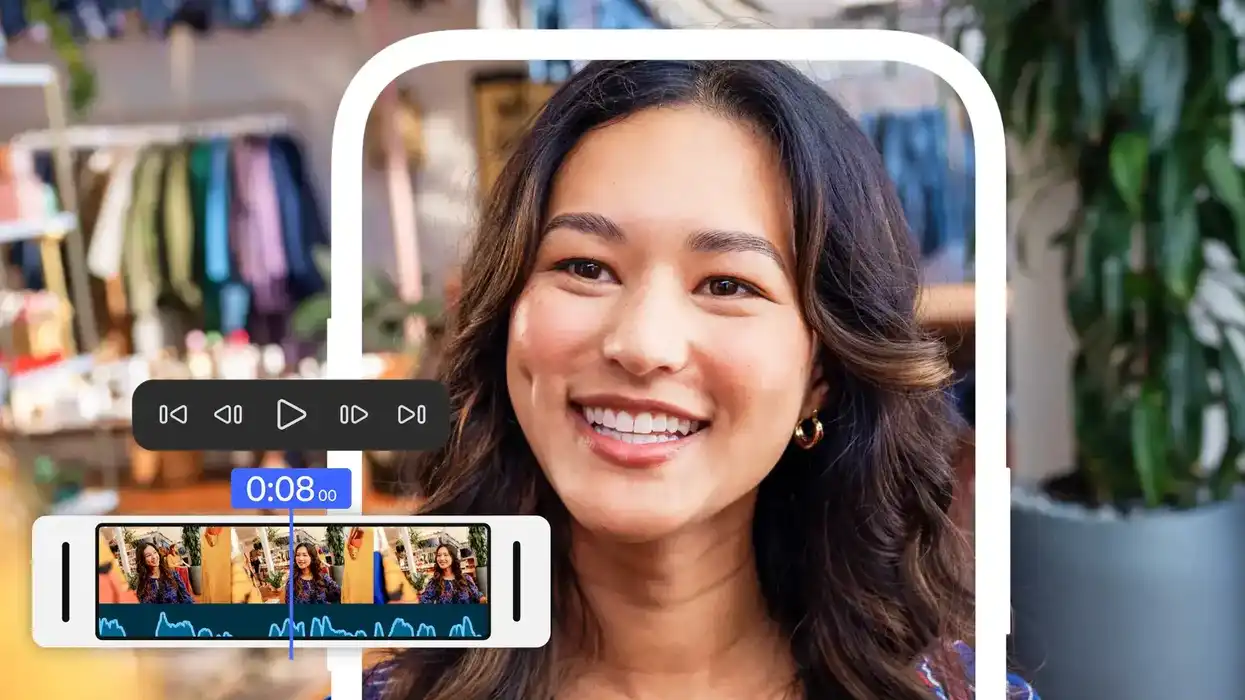
Announced earlier this month, Adobe Premiere for iPhone (which we covered here) is now officially live. This Adobe Premiere mobile app aims to bring the best of the desktop version of Premiere Pro to a new generation of content creators, as well as offer a more seamless connection between both desktop and iPhone versions of the app.
While we covered this announcement before, with Adobe Premiere on iPhone officially going live today, let’s go over some of its new features and workflow updates, as well as—of course—provide you with everything you need to get started with this free app for your iPhones today.
Adobe Premiere on iPhone is Live
Designed to help the next-gen of creators publish and edit video content on the reg (which is how the younger generation speaks, so we hear), Adobe Premiere on iPhone aims to bring the best of Premiere Pro’s pro-level creative controls to a new system without the complexity.
Trusted by all types of film editors, YouTubers, music video creators, and tons more over the years, the rich legacy of Premiere Pro is quite solid, yet the company is pushing for much more in the age of fast content and AI-powered workflows.
The Adobe Premiere app will feature a familiar fast, multi-track timeline, as well as new capabilities to produce studio-quality audio with crystal clear voiceovers and perfectly timed AI sound effects, generate unique content and access millions of free multimedia assets, and send work directly to Premiere desktop for fine-tuning further on a larger screen.Adobe Premiere Mobile App Features
Again, this new mobile app version of Premiere is for everything from editing short films and music videos to social content like YouTube vids and TikTok vertical shorts.
The Adobe Premiere mobile app will still offer access to powerful mobile editing tools and shoot to help creators work seamlessly across surfaces with the flexibility to start their editing projects on the go and finish on the desktop app for precision editing in Premiere Pro.
Here’s a list of several of the main new features to be available in the Adobe Premiere Mobile App:
- End-to-end editing tools that bring full creative control right from your phone like an unlimited, lightning-fast multi-track timeline, 4K HDR editing, frame-accurate editing, bold, animated captions, smooth speed and motion effects and instant background removal.
- AI audio tools for studio-quality sound, including Enhance Speech for crystal clear voiceovers, and Generative Sound Effects for perfectly-timed sound elements.
- Generate unique assets with Adobe’s commercially safe generative AI - from AI-powered stickers to seamless background expansion and image-to-video creation.
- Edit at the speed of inspiration with fast, responsive performance built natively for iOS, simple media management, and a distraction-free, watermark-free experience.
- Vast libraries of free creative assets including millions of stickers, images, Adobe fonts, and royalty-free music tracks to make your content pop.
- One-tap exports to every major social platform, from TikTok and YouTube Shorts to Instagram and beyond, including the ability to resize your video for each platform and always keep the main action in frame.
- Free mobile app offers all the video editing essentials for free, with upgrades available for additional generative credits and storage.
- Adobe’s Legacy NLE is Coming to Your iPhones, Available for Free Later This Month ›
- Adobe Premiere Pro, Audition, and Rush in Apple M1 Beta Support ›
- Learn Why Editing on Mobile Has Never Been Easier ›
- Adobe Premiere Rush Update Allows You to Separate Audio from Video Clips ›
- Adobe Premiere Pro and After Effects Now Supports ProRes RAW ›
- Adobe Premiere Pro 14.9 Includes Faster Exports for H.264 and HEVC on Macs ›
- Adobe Announces That Its Premiere Mobile App Will Finally Be Available on Android | No Film School ›