Behind the Scenes With 'Clean Hands' Editor Owen Jackson
Based on a true story, director Jake Allyn’s Tribeca feature 'Clean Hands' follows Kevin Simmers, a Maryland narcotics officer who is forced to reckon with his approach to drug enforcement as he watches addiction hurt the person he loves most.
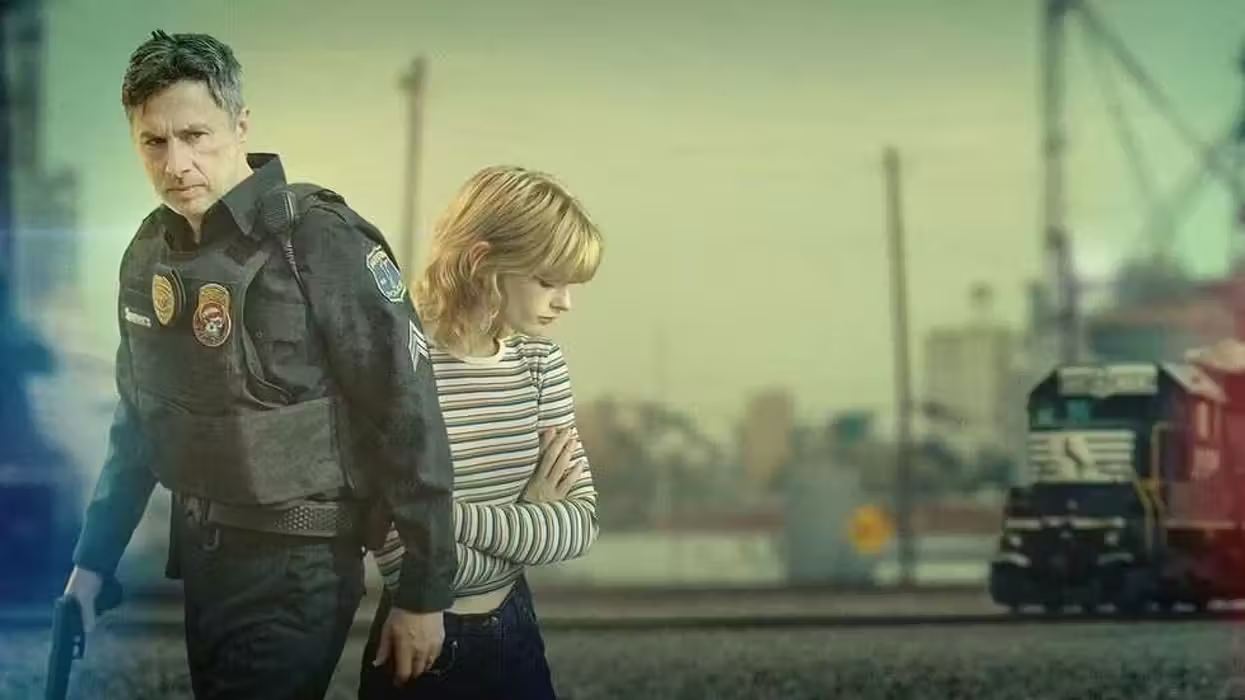
'Clean Hands'
Starring Zach Braff and Esther McGregor, Clean Hands draws much of its power from unscripted moments—real women in treatment, an actual counselor from the recovery mission Simmers went on to found, and a wordless scene of a father and daughter that says everything the film needs to say.
Editor Owen Jackson, a longtime collaborator of Allyn’s, was uniquely qualified to find those moments. Equipped with a documentary background and over a decade of experience with Adobe Premiere, Jackson knows how to hunt for a story in raw, unscripted material. He built a meticulous organizational system to manage hours of footage, which included text slates, logging scene numbers, shot types, and performance notes, all color-coded so nothing slipped through the cracks. Speech to Text let him move quickly through alternate takes and line readings while Text-Based Editing became integral to his feature workflow. What started as a three-hour rough cut became a tight 108-minute film, shaped by a “willingness to ruthlessly scrutinize every scene and frame.”
We got into the weeds with Jackson on the edit behind Clean Hands. Read more of the conversation below.
How did you first become involved with this film?
Owen Jackson: When I first read the script, I was blown away; it was an immediate, easy sell. Working on a project with this much gravity was truly a humbling experience, and I hope it stands as a testament to what the real Kevin Simmers has built with his mission, Brooke’s House.
Beyond the script, Allyn and I have been collaborating for years. I edited his first feature, “Ride,” and we immediately clicked. We’ve become close friends outside of work, so in this industry, whenever you get the chance to work with your friends on a great project, it's always an easy, “yes!”
How do you begin a project/set up your workspace? Did you do anything differently when setting up your workflow for this project?
OJ: For Clean Hands, I had a fantastic assistant editor, Robby Sykes, who helped build out my initial working timelines. He handled breaking everything down and sent me individual Premiere projects with the daily footage, which I then imported into my master project.
We normally start with a 24-hour timeline that has all the day’s cameras and audio synced and laid out by timecode. From there, each scene is broken into an individual timeline, and each take is nested to keep the audio track count manageable. That timeline also includes markers and color codes for my initial watch notes, tracking moments I love, actor reactions, and specific details I want to remember.
After scrutinizing the footage, I do my scene assembly, which eventually gets pieced into the larger film. In my main timeline, I meticulously color-code audio tracks for dialogue (production audio), temp ADR/VO, SFX, ambience, and music. My first assembly timelines can get a bit messy, but I make time at the end of each day to do a quick cleanup to ensure everything is literally and figuratively on the right track.
What conversations did you have with your director to align on the creative vision for the project? What did collaboration look like throughout production and post?
OJ: During pre-production, Jake and I usually align by talking about other films. For Clean Hands, I watched or re-watched about 10 films that directly or indirectly inspired the tone. These films serve as a springboard for creative discussion rather than a blueprint to copy. During production, I was editing just off-site from the set. It was an ideal setup; I could drop by the set briefly without lingering, and after "taillights" (wrap), Jake would stop by the edit bay to peek at the day's work. Seeing the film come together in real time while still shooting was a massive morale booster for him after a usually tough, tiring day on set.
Shortly after production wrapped, I completed the first working assembly, and we hit the ground running. Jake is always eager to jump into the edit bay, but he graciously affords me the space to build the initial assemblies on my own, experiment, and make early structural suggestions. My favorite part of the job is the collaborative shorthand in the NLE, including the conversations around structure, mood, pacing, and performance. I once told Jake that “we can do anything in the edit,” and that has jokingly become the mantra of our process.
Tell us about a favorite scene or moment from this project, and why it stands out to you.
OJ: That’s a tough, but great question. There are a handful of unscripted moments in the film where I was able to lean into my documentary background. Early on, there is a montage where Brooke attends a drug counseling class that was entirely unscripted, featuring real testimony from women in treatment and an actual counselor from Brooke’s House.
We distilled over an hour of raw, ad-libbed footage down into a two-minute montage. It culminates in a beautiful, minimalist scene of Kevin and Brooke howling at the top of a dam, a moment with almost no dialogue that perfectly sums up the entire movie: a father’s unconditional love for his daughter.
What Adobe tools did you use on this project, and why did you choose them?
OJ: The film was cut entirely in Adobe Premiere. Having used it for over 10 years, it’s where I feel the most creatively fluid and comfortable. On this project, the ability to use Dynamic Link to jump seamlessly back and forth with After Effects for temp VFX comps and graphics formatting was a massive timesaver.
I also often use Text-Based Editing for short-form documentary work to construct a quick story edit from a transcript, and having those tools integrated directly into Premiere makes the entire ecosystem incredibly powerful for feature workflows as well.
What were some specific post-production challenges you faced that were unique to the project? How did you tackle them?
OJ: To be completely honest, the post-production process on this film was incredibly smooth. Our biggest creative challenge was shape and pacing—getting the film down to the final cut. Jake and I made it a point to come into the edit bay every single morning with fresh eyes and new ideas. I like to go for a run or walk in the morning before work; getting away from the computer screen and just thinking about the film outside of the NLE is super important. It’s always difficult to start cutting out beautifully acted/written material, but ruthlessly scrutinizing every scene and frame is what the process demands.
What's your favorite Premiere shortcut or hack, and why?
OJ: I love the depth of keyboard customization Premiere offers. Building out a robust, personalized layout of hotkeys drastically expedites my workflow. I am a big fan of the Rolling Edit Tool (as every editor should be) to shift and refine cut points. Being able to see both frames dynamically on either side of the cut is essential. I also use it frequently to lasso a large group of audio cut points and apply crossfades to multiple audio tracks simultaneously.
Who is your creative inspiration?
OJ: My inspirations span a lot of different genres and media. Any filmmaker who can seamlessly blend comedy and drama has my respect. I've watched every Coen Brothers movie multiple times. Paul Thomas Anderson and Martin McDonagh are also massive inspirations for me. John Hughes films are what actually got me excited about the idea of working in the film industry. The documentarian/editor Adam Curtis’s use of atmosphere and archival footage is inspiring to me (even while cutting narrative).
My buddy Michael Carter (whom I used to be an assistant editor for) taught me the most valuable lesson: to have fun in the edit bay. We used to make a reel of "joke" edits for our projects: adding off-the-cuff sound effects and repurposing footage. Sometimes, goofing around and trying the "wrong" thing is the best way to find exactly where the edit needs to go. I’m also inspired by my loving wife, Sarah, who puts up with the awful hours I sometimes work and is not afraid to watch my rough cuts between her Bravo binges.
What advice do you have for aspiring filmmakers or content creators?
OJ: Learn how to edit. I firmly believe that the best directors and cinematographers deeply understand the editing process: coverage, pacing, timing, etc. Even if your ultimate goal isn’t to be an editor, mastering the language of the cut will make you significantly better at your primary job. I also think that working in the documentary space before cutting my first narrative made me a better narrative editor. Hunting for and building a story from the ground up is a great muscle to flex. There is so much you can do these days with so little!