Want to Improve Audio Quality When Capturing from Your Computer?
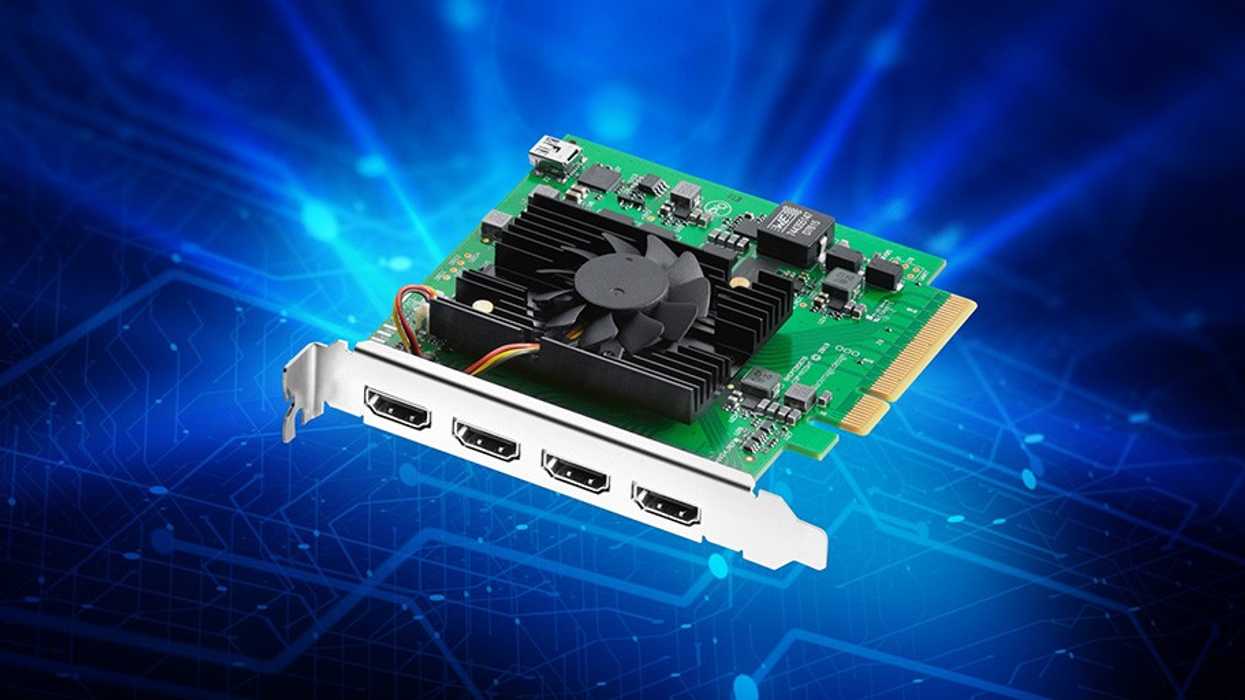
The latest Desktop Video 15.1 update is here to improve audio quality when capturing from your computer on the Blackmagic Design DeckLink Quad HDMI Recorder.
Desktop Video 15.1 Update
A pretty significant update is coming to Blackmagic Design’s Desktop Video application with a new 15.1 update that is set to offer some major improvements to the DeckLink Quad HDMI Recorder. If you’re an editor or digital content creator looking to record and capture footage and audio from your computer, this update is going to offer improved audio quality—something that’s quite valuable.
Let’s take a look at the new Desktop Video 15.1 update and what it can offer for working with your DeckLink Quad HDMI Recorder.
Blackmagic Desktop Video 15.1 Update
So, while this is big news, it’s really only two-fold. The first is that this update has fixed a few bugs, mainly an issue with distorted audio when capturing computer resolutions. The second issue fix is where an 8-bit RGB input video was detected as 10-bit RGB, which is understandably a problem that is thankfully getting an easy solution.
Here’s the full list of everything new in Desktop Video 15.1:
This update has the following bug fixes for DeckLink Quad HDMI Recorder.
- Fix distorted audio when capturing computer resolutions.
- Fix issue where 8-bit RGB input video was detected as 10-bit RGB.
OS Requirements and Supported Products
If you haven’t checked out Desktop Video before, here are some minimum system requirements and supported products to review.
Minimum System Requirements for Mac OS
- macOS 14.0 Sonoma.
- macOS 15.0 Sequoia or later.
- Mac with Apple Silicon or Intel-based CPU.
- Mac with a Thunderbolt connection or PCIe slot.
- 8 GB of system memory.
Note: The following products are supported on macOS Ventura and Sonoma:
Apple silicon and Intel Macs:
- DeckLink Duo 2
- DeckLink Quad 2
- DeckLink Quad HDMI Recorder
- DeckLink 8K Pro G2
- DeckLink 4K Extreme 12G
- DeckLink IP HD
- DeckLink IP HD Optical
- DeckLink IP/SDI HD
- DeckLink Micro Recorder
- DeckLink SDI Micro
- DeckLink Mini Monitor HD
- DeckLink Mini Monitor 4K
- DeckLink Mini Recorder HD
- DeckLink Mini Recorder 4K
- DeckLink SDI 4K
- DeckLink Studio 4K
- UltraStudio Recorder 3G
- UltraStudio Monitor 3G
- UltraStudio HD Mini
- UltraStudio 4K Mini
- UltraStudio 4K Extreme 3
- Intensity Pro 4K
Third-Party Software Support
- DaVinci Resolve 18 and 19.
- Fusion Studio 18 and 19.
- Apple Final Cut Pro.
- Adobe Premiere Pro CC 24 and 25.
- Adobe After Effects CC 24 and 25.
- Adobe Photoshop CC 24 and 25.
- Adobe Character Animator CC 24 and 25.
- Autodesk Flame 2024.
- Avid Media Composer 2024.
- Avid Pro Tools 2024.
- The Foundry Nuke (Intel Macs only).
Windows Specific
Minimum system requirements for Windows
- Microsoft Windows 10 or 11 64-bit
- Microsoft Windows computer with either Thunderbolt, PCIe slot.
- 8 GB of system memory.
Third-Party Software Support
- DaVinci Resolve 18 and 19.
- Fusion 18 and 19.
- Adobe Premiere Pro CC 24 and 25.
- Adobe After Effects CC 24 and 25.
- Adobe Photoshop CC 24 and 25.
- Adobe Character Animator CC 24 and 25.
- Avid Media Composer 2024.
- Avid Pro Tools 2024.
- Magix Vegas Pro 20.
- The Foundry Nuke.
Installing Desktop Video Software
If you have installed the drivers prior to installing any of these applications, we recommend that you uninstall and reinstall the drivers. This will ensure that all relevant components are installed in their required locations.
You can find the download on Blackmagic Design’s website here.- Pricing and Details for the Blackmagic URSA Cine 17K 65 Are Finally Here ›
- Exclusive: How Blackmagic Design is Democratizing Color with Resolve ›
- Blackmagic Design’s New 16TB Media Module Can Help Shooters Record, Store, and Transfer Faster ›
- Blackmagic Design Kicks Off NAB 2025 With PYXIS 12K Announcement ›
- The Philosophy of Grant Petty and the Future of Blackmagic Design ›
- Get Faster Load Times for Your Blackmagic Cloud Projects With Latest Resolve Update ›
- Blackmagic Design’s DeckLink IP 100G is Now Available and Offering Capture and Playback Support ›
- Blackmagic Design Desktop Video 16.0.1 is Released to Fix Minor Bug With DeckLink 8K Pro ›
- Blackmagic Design Adds New Capture and Playback Support With Desktop Video 16.3 Update | No Film School ›