Digital Anarchy Has a New Organization Solution for Task Tracking in Adobe Premiere
Feeling lost in Premiere? Digital Anarch has just unveiled ShotNotes, a new notepad and task-tracking panel that aims to organize and speed up your Premiere Pro workflows.
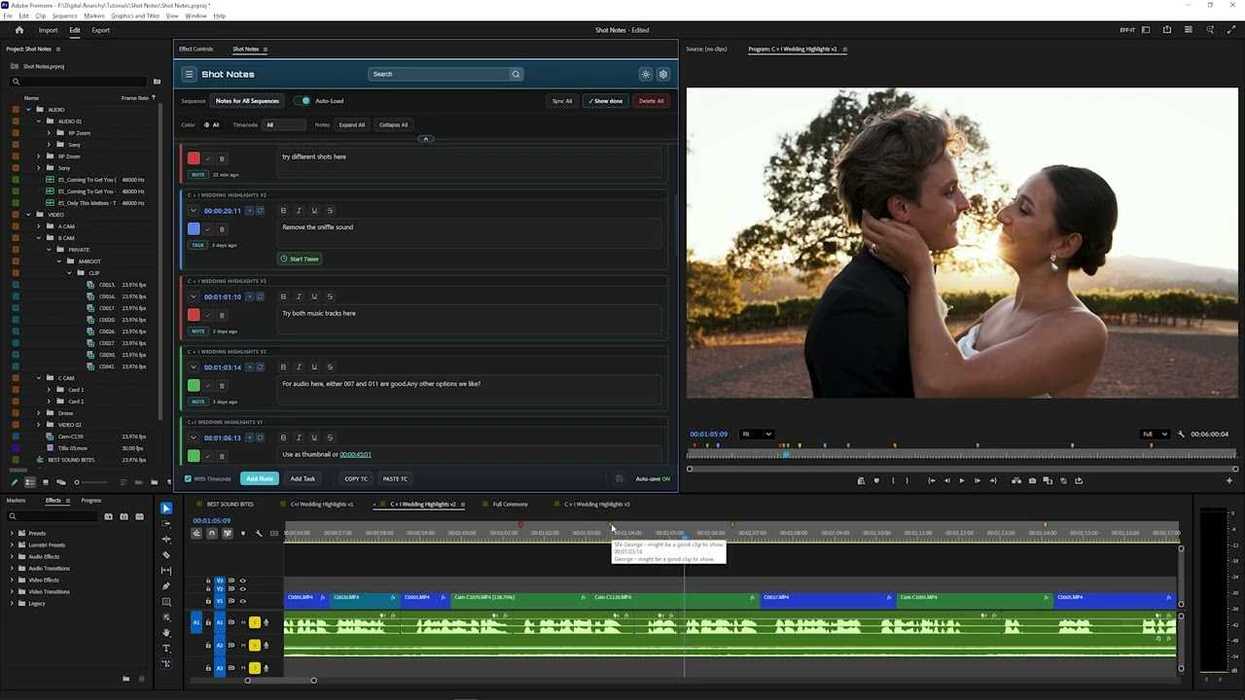
Digital Anarchy ShotNotes
See, not all workflow improvement tools need to be AI. Digital Anarchy has just announced the release of ShotNotes for Adobe Premiere. Designed to tackle one of the most persistent “low-tech” problems video editors encounter in their NLEs, this new tool offers a notepad and task-tracking panel in Premiere that certainly looks quite helpful.
Let’s take a look at Digital Anarchy’s ShotNotes and explore what it can do to clean up and speed up your Adobe Premiere timelines and workflows.
Digital Anarchy Announces ShotNotes
Designed to be a native Premiere panel, Digital Anarchy’s new ShotNotes tool is a pretty straightforward offering for video editors. If you’d like to better organize your projects by adding rich notes directly to your sequences, then this might be an option for you.
What’s cool about ShotNotes is that it lets editors add time codes to their notes, link to other sequences, and even track how long editing tasks take. All helpful features that aren’t major AI-style gamechangers, but all quite helpful and intuitive.
Plus, unlike standard markers, which are available in Premiere already but can get cluttered or lost in your more complex sequences, ShotNotes offers an easy way to keep track of your thoughts and to-do items with clickable timecodes and links to other sequences. You can even link out to other webpages and also create markers to fit into a Marker workflow.
Built-in Time Tracker and Other Features
I’ll be honest, this tool actually has a lot more features than you might expect for something that is kind of a simple solution. In addition to the features mentioned above, ShotNotes also includes a built-in time tracker.
This means that editors will be able to log tasks, track how long each one takes, and export a detailed report. This could be helpful for solo editors, small or large crews, or freelancers looking to justify hours. Once you're done with your projects, you can export a report of the tasks, how long they took, and a list of what you did while the timer was on.
More features of note:
- Add notes and tasks directly in Premiere Pro.
- Eliminates the need for external apps or notebooks (or sticky notes)
- Notes support timecode, links to other sequences, and weblinks
- Use the clickable timecode to instantly jump to specific edit points in any sequence directly from your notes
- Creates markers for each note to fit into your Marker workflow
- Built-in time tracker logs how long tasks take and generates exportable reports
- Export to a variety of formats for sharing, printing, or backup
Pricing and Availability
ShotNotes is out and available now for $129 (though it appears to be on sale until May 15th for $99). It is only available for Adobe Premiere at this time. For more info, you can check out the company’s website here.
- Sony Adds Sound Separation to Its Catalyst Prepare Plugin for Premiere and Resolve ›
- 16 Incredible Free Adobe Plugins from the Editor of 'Sharknado 2' ›
- Five Adobe Premiere Audio Effects That Will Make Your Videos Sound Great ›
- Adobe Premiere 25.6 Adds Smarter Search, Faster Edits, and Seamless Collaboration ›
- Motion Array's Premiere Pro Plugins and More Are Free for the Next 3 Months ›
- Speed Up Your AI-Assisted Edits With New Feedback and Unified Logging Modes ›
- Major Adobe Updates Are Here: Color Mode in Premiere, Frame.io Drive, and More AI Capabilities ›
- A New Option for iPhone Filmmakers is Here to Help Convert Your Apple Log 2 Footage ›