Major Adobe Updates Are Here: Color Mode in Premiere, Frame.io Drive, and More AI Capabilities
Ahead of NAB 2026, Adobe is rolling out a ton of new features, updates, and capabilities to Premiere, Frame.io, and its AI Firefly Video Editor. Here’s what you need to know.
With NAB 2026 about to kick off, Adobe has let loose its announcement of all the companies' latest updates, including notable new features and capabilities set to come to Premiere, Frame.io, and Firefly.
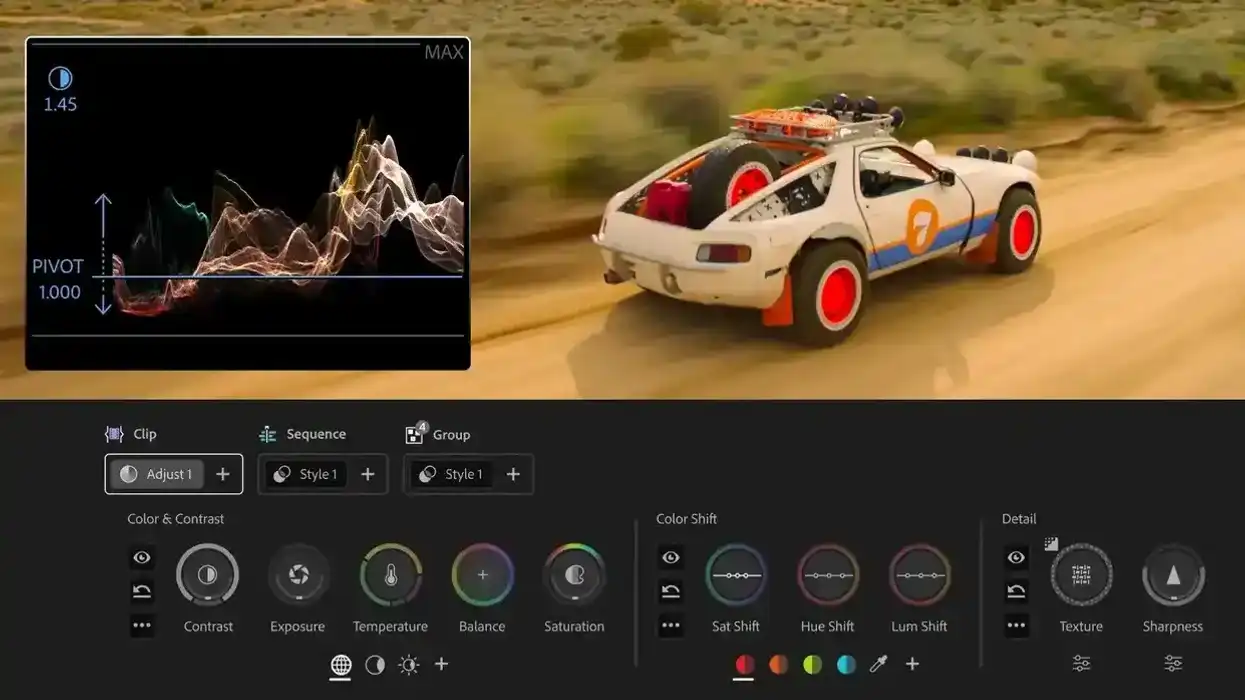
The biggest news here for traditional video editors might be the introduction of a brand-new Color Mode in Premiere, a first-of-its-kind color grading experience built from the ground up and specifically for video editors. If Blackmagic Design is going after Photoshop with its update, then this news might be Adobe’s move to go after DaVinci Resolve.
Adobe has also introduced Frame.io Drive, a new desktop application that lets editors work with Frame.io as if it's stored locally, as well as new capabilities in the Firefly Video Editor, including the addition of the notable Kling 3.0 and Kling 3.0 Omni AI video models.
Adobe Premiere Color Mode
Let’s start by looking at this new Color Mode coming to Adobe Premiere. Being dubbed a “landmark” color-grading experience designed specifically for video editors, this new feature aims to make Premiere a true one-stop shop for them.
Being rolled out as a beta release, Color Mode is a first-of-its-kind color-grading experience that offers unique quirks designed to help video editors intuitively. What’s unique about this color mode is that the feature keeps video front and center in the edit, so editors will always have full visibility into how the color flows through their project at every level.
If you’re curious about this new Color Mode, we’ll have lots more to explore in the future, but for now, you can find more info on Adobe’s website here.
The company has also rolled out its new Premiere 26.2 update, featuring a range of improvements, including Film Impact-powered effects and transitions, as well as other features. You can read more about them here.
Firefly Video Editor Updates
As is the case with most Adobe news these days, these updates wouldn’t be complete without news of new AI video models and features being added to the mix. As part of the Adobe Firefly Video Editor, the company is adding more video models to its browser-based editor.
Kling 3.0 and Kling 3.0 Omni (perhaps the best, or at least most popular, model currently going that isn’t Seedance 2.0) are being added to the list of AI models which Firefly users will have access to in the Vide Editor. These models join more than 30 industry-leading models already available in Firefly, including Nano Banana 2, Veo 3.1, and Runway Gen-4.5.
The Firefly Video Editor is also getting some new audio upgrades, including Enhance Speech, an award-winning feature that automatically cleans up dialogue. Adobe Stock will also now be fully integrated directly into the Firefly Video Editor, giving users access to over 800 million licensed assets, including video, images, audio, and sound effects.
Adobe is also rolling out a new Firefly AI Assistant feature that will bring Photoshop, Premiere, Lightroom, Illustrator, and more into a single conversational workflow, which is also pretty major and something we'll explore much more later. You can read more here for now.
Frame.io Drive and Future Innovations
Finally, Adobe has announced Frame.io Drive, a new desktop application that lets users mount their Frame.io projects directly on their computers and work with their media as if it were stored locally.
With this new Frame.io Drive, editors, designers, and motion designers can all now work from the same shared project the moment they need it. Ideally, this will help editors and teams say goodbye to shipped drives, transfer links, or separate storage systems.
This is another nice, future-focused update for cloud workflows and joins other far-reaching updates we’ve covered in the past, like the company’s research into MotionStream, which explores ways to add new creative controls for AI workflows.
Overall, Adobe has introduced a lot to Premiere and Firefly with these updates. If you’d like to explore more about what’s new, you can find more info on the company’s website here.
- What’s New in After Effects? Here Are All of the Latest Motion Design, Compositing, and Animation Updates ›
- Premiere Pro Gets New AI-Powered Search Tools and Other Improvements with 25.2 Update ›
- Adobe Adds Even More AI-Powered Editing Tools and Upgrades to Premiere and After Effects ›
- DaVinci Resolve 21 Introduced With Hundreds of New Features, AI Tools, and a Photo Page ›
- Digital Anarchy Has a New Organization Solution for Task Tracking in Adobe Premiere ›
- Adobe Showcases Premiere Pro’s Generative Extend and Media Intelligence at NAB 2025 ›
- Maxon Announced Debut of Cinema 4D on iPad, the Return of Autograph, and More Major Expansions ›
- Why Adobe Rebuilt Color—And Why It Matters for Filmmakers ›
- Premiere Color Mode vs. Lumetri — What’s Different and Why It Matters for Filmmakers ›
- This AI Editing Tool Just Left Beta and It’s Coming for Premiere and Resolve Users ›
- Adobe Continues its Double Down into Agentic AI With Firefly Assist Now Available in Public Beta ›
- Firefly Boards Inside Photoshop and Lightroom? Adobe Might Be Changing Its Workflow Game ›
- Inside Premiere’s Color Mode: Adobe’s Biggest Color Grading Overhaul in a Decade ›
- Color Mode in Premiere: Setting Up for Success ›
- The 5 Things Film Editors Need to Know ›
- elevate.io’s Browser-Based Video Editing Platform Gets New Color Wheels and LUT Features ›
- The Clip Grid — Your New Best Friend ›
- Oh Hush! Adobe Introduces a Global Audio Mute Feature to Premiere Plus Other Updates ›
- Adobe Announces Massive Expansion of Its Agentic AI Capabilities in Firefly and Apps like Premiere ›
- Premiere Color Mode (Beta): Understanding Adjust vs. Style in the Operations System ›
- Color and Contrast Controls in Color Mode: Why Zones Work Better Than Lift/Gamma/Gain ›
- Adobe Firefly Overhauls Its Audio Capabilities With Music, Speech, and Sound Effects All Now in One Place | No Film School ›
- Maxon’s Fall 2026 Release Brings Bigger Worlds, Faster Workflows, and Major Updates | No Film School ›