I have been in the outline phase of my best script for what feels like months. I just want to get the idea down, but I have been tripping up when it comes to the middle and other points.
So, in order to break myself from the chains of not knowing the plot points, I decided to do something kind of wild; I basically outlined the same idea in every possible way I know how. Yes, I went through all the tried and true ways people have told me to outline over the years, and tested them with this script idea.
What I found was that not all outlines are created equal. Depending on whether you’re a visual dreamer or a logical architect, the tool you choose can either unlock your creativity or become a digital roadblock.
Let's dive into what I discovered.
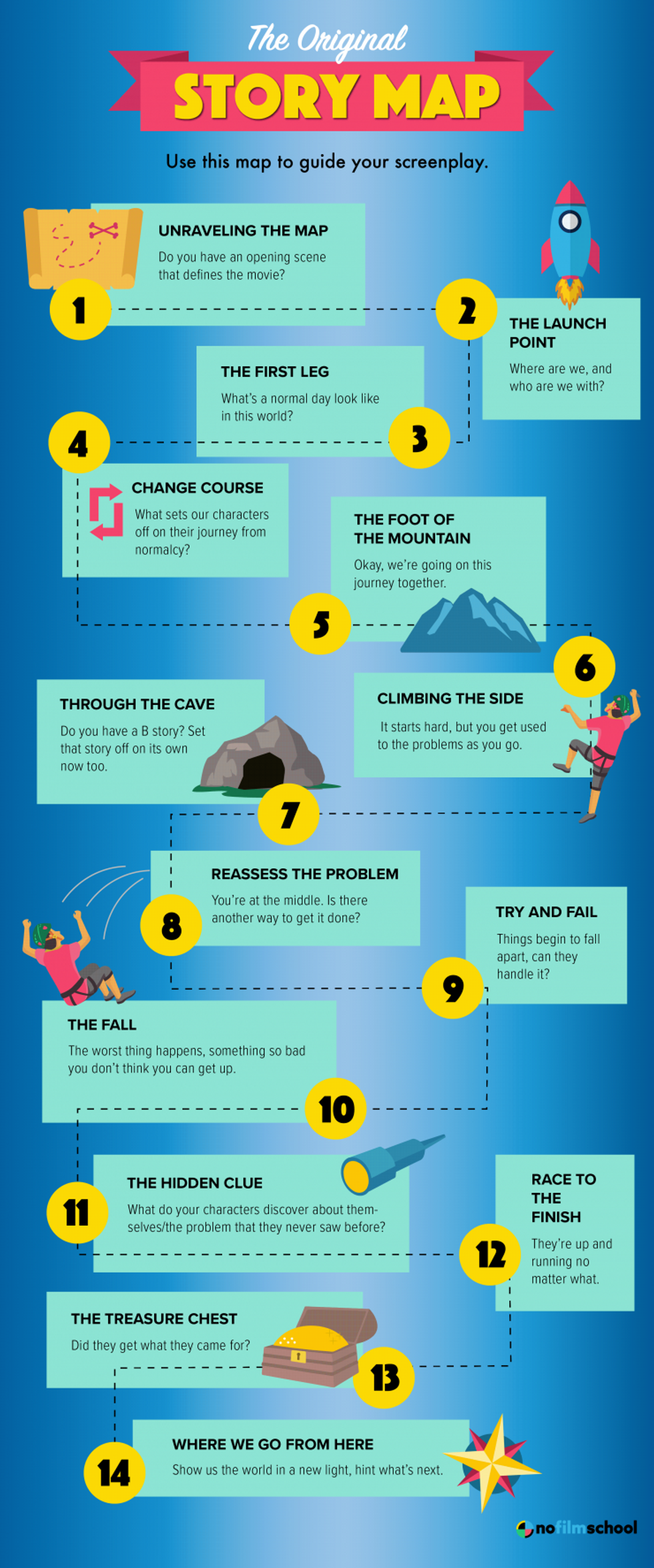 Free Screenplay Outline Template: The Story Map Credit: No Film School
1. Digital Index Cards
Best for: Structuralists who love to "shuffle" their story.
Nowadays, many of the top screenwriting software programs come with digital index cards. Basically, they're a side of the program where you can make a header and then a description and move the cards around.
The digital corkboard is the modern evolution of the classic writers' room. It allows you to see your story as a series of movable blocks.
I loved how you were able to lay the entire story out beat by beat, and then switch the cards' order if you needed to swap things in or out.
- Top Tools: Celtx, Final Draft (Beat Board), Scrivener, Causality.
| Pros | Cons |
| Effortless Reordering: Drag a scene from Act 3 to Act 1 and the software updates the flow automatically. | Steep Learning Curve: Software like Causality is incredibly powerful but takes time to master. |
| Subplot Tracking: Color-code cards to ensure your B-story isn't disappearing for 30 pages. | Price Point: High-end industry software often comes with a "Pro" price tag. |
2. Mind Mapping
Best for: Worldbuilders and mystery writers.
This is one of those nerdy things I was sent and had never used before, but since I'm working on a mystery, I thought I'd try it out.
Mind mapping is a visual technique for organizing information around a central topic, using a hierarchical structure with branches for related ideas, subtopics, and details, enhanced by colors, images, and keywords to boost creativity, memory, and problem-solving.
People love it because it is supposed to mimic a natural way the mind gathers and disseminates information.
Here's How You Mind Map:
- Central Idea: Write your main topic or question in the middle of a blank page.
- Brainstorm Main Branches: Draw thick branches from the center for major themes or keywords related to your topic.
- Add Sub-Branches: Create thinner branches off the main ones for subtopics, details, or supporting ideas, using single words or short phrases.
- Use Visuals: Incorporate colors, symbols, images, and different fonts to make the map more memorable and engaging.
- Connect & Organize: Use arrows or lines to show relationships between different ideas, and rearrange branches as needed to structure your thoughts.
If your story is a web of secrets or a complex ensemble, a linear list might feel too restrictive. Mind mapping tools let you grow your story organically from a central idea.
- Top Tools: Miro, Scapple, MindMeister.
| Pros | Cons |
| Visual Freedom: Map out character relationships and thematic symbols non-linearly. | Translation Issues: Eventually, you have to turn that "web" into a linear script, which can be jarring. |
| Infinite Canvas: You never run out of room for "what if" scenarios. | Easy to Get Lost: Without a timeline, you might forget to actually move the plot forward. |
3. Logic-Based Plotters
Best for: Writers who love data and pacing analytics.
People love trying new tech to break their story. And there are lots of tools that will use prompts or just some sort of newfangled way to do things.
A new wave of "smart" outlining tools treats your script like a living ecosystem. These apps help you visualize the emotional "highs and lows" of your protagonist.
For me, this just isn't how I learn or write, so I didn't love them, but I know people who need these visuals who swear by them.
- Top Tools: Prewrite, Arc Studio Pro.
| Pros | Cons |
| Pacing Graphs: See a visual representation of your story's tension and conflict. | Subscription Fatigue: Most of these operate on a monthly fee rather than a one-time purchase. |
| Character Arc Tracking: Automatically generates "stats" on character screen time and development. | Over-Analysis: It’s easy to focus on "hitting the graph" rather than writing from the heart. |
4. The Purists: Traditional Beat Sheets
Best for: Writers who want to get straight to the dialogue.
Guys and Gals, I don't know what to say except that this was for me. I am a traditionalist. I love making a beat sheet in my notebook with a pen and then typing it all out into a Google Doc.
Sometimes, the best tool is the one you already know how to use. A beat sheet is a simple, bulleted list of every major plot point.
You can do it in pretty much any writing software, and I strongly suggest writing by hand first.
- Top Tools: Highland 2, Google Docs, Microsoft Word.
| Pros | Cons |
| Zero Distractions: No fancy UI or graphs—just you and the story beats. | Static Nature: Moving a scene means a lot of messy cutting and pasting. |
| Highly Portable: You can update your outline from your phone while waiting for coffee. | Hard to Visualize: It’s difficult to spot "pacing holes" in a 10-page text document. |
5. The Tactile Choice: Analog Boards
Best for: Writers who need to get away from the screen.
I think this really helps in TV. I know people who only do it for features, too, but every TV idea I've ever worked on, I have done one of these, and it blew my mind.
Never underestimate the power of a physical wall covered in Post-it notes. Many A-list showrunners still prefer this method over any software.
In a room full of people, it's still the best way to get everyone imagining together.
| Pros | Cons |
| Kinesthetic Memory: Physically moving a card helps you internalize the story rhythm. | Zero Backups: One spilled coffee or a curious toddler can ruin months of work. |
| The "Big Picture": Seeing your entire movie on one wall is an unmatched perspective. | Manual Labor: You have to manually type everything into your screenwriting software later. |
Final Verdict: Which Should You Choose?
Look, choose whatever gets your idea done. After all that, it was still a pen and a notebook and a bunch of ambient piano music for me.
Here are my findings in brief:
- The "Visual Architect": Go for Miro or Scapple.
- The "Industry Pro": Stick with Final Draft or Scrivener.
- The "Data Nerd": Give Prewrite a spin.
Summing It All Up
At the end of the day, the best thing you can do is whatever makes you comfortable. We try to have a ton of outline tools here, so always check No Film School to master your spec screenplay.
We have lots of stuff on the "Hero's Journey" and "Save the Cat" and even templates and structure paradigms.
Let me know what we can help with in the comments.
- How Do Professional Screenwriters Outline Their Projects? ›
- Check Out This Free Script Outline Template ›
- Why Crafting a Second Outline Is the Secret to the Rewrite Process ›
- How a Professional Screenwriter Outlines a Project ›
- George R.R. Martin's Writing Strategy Doesn't Involve Outlining ›
- 7 Incredible “Plant & Payoff” Moments Set Up In The First Act ›