There are only so many times and ways in which we can basically say the same following statement: AI is changing the landscape of our industry as we know it. Today, Adobe has shared the news that the company is launching Adobe Photoshop, Adobe Express, and Adobe Acrobat for ChatGPT.
Aiming to build on the company's genetic AI, this new ChatGPT integration should enable users to more easily enhance photos, design assets, and create and edit documents by simply describing what they want to achieve with their words.
As opposed to, you know, doing it themselves in the apps. Let’s explore what’s going on.
Adobe Brings ChatGPT Into the Fold
So far it sounds like the only apps getting this ChatGPT feature are the ones mentioned above, but it’s hard to imagine that Premiere, After Effects, Audition, and others might get similar tools in the future.
“We’re thrilled to bring Photoshop, Adobe Express and Acrobat directly into ChatGPT, combining our creative innovations with the ease of ChatGPT to make creativity accessible for everyone. Now hundreds of millions of people can edit with Photoshop simply by using their own words, right inside a platform that’s already part of their day-to-day.” — David Wadhwani, president, digital media, Adobe.
What’s notable about this news, though, is simply that it’s combining two of some of the biggest players in the AI and creation spaces. The goal, for Adobe at least, is to expand upon the company’s conversational experiences powered by its agentic AI and Model Context Protocol (MCP).

Credit: Adobe
How it Works
Overall, this new tool sounds quite simple to use, believe it or not, as it will allow users to have a simple conversation with the ChatGPT interface to make it easy for everyone to edit photos, enhance designs, and transform documents without leaving ChatGPT.
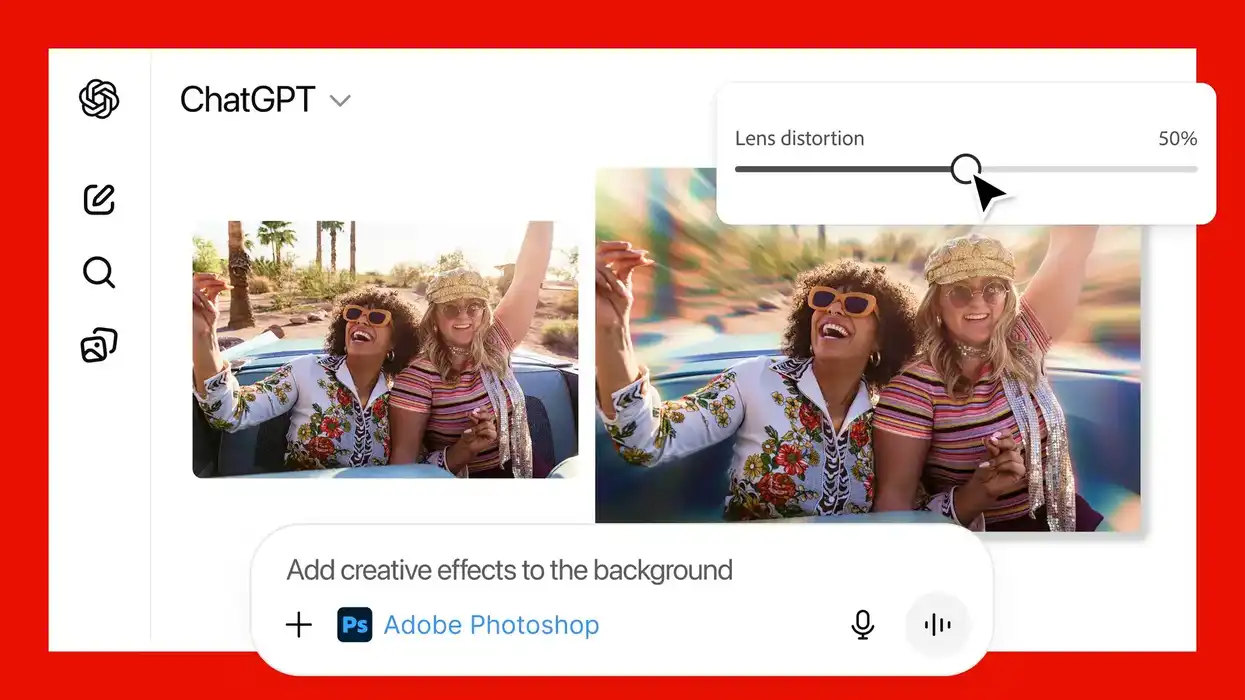
Accessing Adobe’s apps in ChatGPT will be as simple as typing the name of the app followed by an instruction. Adobe shares an example where, to blur the background of an image with Photoshop, users can type: “Adobe Photoshop, help me blur the background of this image.” ChatGPT will then automatically surface the app and use contextual understanding to guide the user through the action. You can check out a more in-depth explanation on Adobe’s website here.
And here are some more examples of how Adobe apps for ChatGPT can be used:
- Easily edit and uplevel images with Adobe Photoshop: Adjust a specific part of an image, fine-tune image settings like brightness, contrast, and exposure, and apply creative effects like Glitch and Glow — all while preserving the quality of the image.
- Create and personalize designs with Adobe Express: Browse Adobe Express’ extensive library of professional designs to find the best one for any moment, fill in the text, replace images, animate designs, and iterate on edits — all directly inside the chat and without needing to switch to another app — to create standout content for any occasion.
- Transform and organize documents with Adobe Acrobat: Edit PDFs directly in the chat, extract text or tables, organize and merge multiple files, compress files, and convert them to PDF while keeping formatting and quality intact. Acrobat for ChatGPT also enables people to easily redact sensitive details.

Credit: Adobe
Price and Availability
Here at launch, Adobe is making Photoshop, Adobe Express, and Acrobat for ChatGPT are free to ChatGPT users globally and available starting today, December 10th, on ChatGPT desktop, web, and iOS.
Adobe Express for ChatGPT is also available on Android, while Adobe promises support for Photoshop and Acrobat for ChatGPT on Android coming soon.
- 5 Ways To Use ChatGPT in Your Video Editing Process ›
- Eddie AI Launches its First NLE Extension With Adobe Premiere Pro Plugin ›
- Adobe Firefly – A Look Into the Future of Generative AI for Video ›
- The “ChatGPT for Video Editing” Tool Eddie AI Releases Automatic Multi-Cam Editing Feature ›
- Adobe is Adding Conversational AI Editing to Photoshop and Firefly Images. Is Video Next? ›
- Adobe Announces It Is Further Integrating Into ChatGPT With New Unified Plugin | No Film School ›
- Adobe Announces More Interactive Editing Controls Are Coming for its Plugin in ChatGPT | No Film School ›