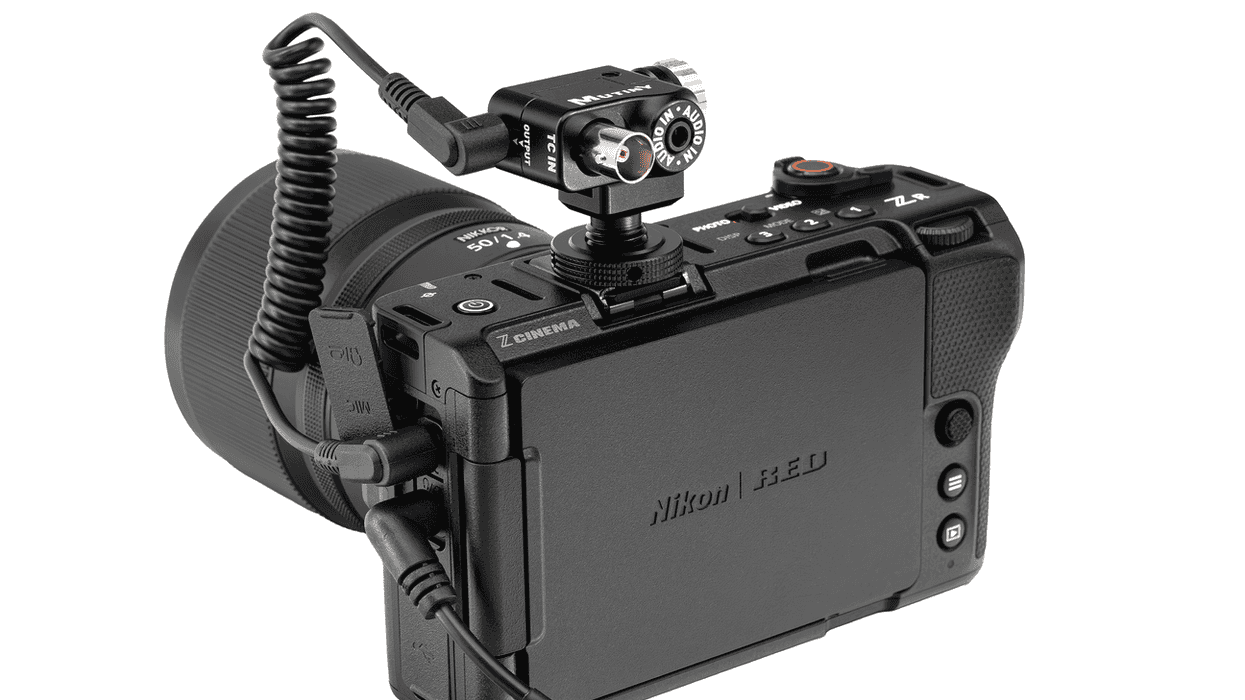
While not a major invention, it can sometimes be the small upgrades to your video workflows that can make all the difference. The new TC-A TIMECODE + AUDIO BREAKOUT from Mutiny is available for any mirrorless camera with a mic jack.
This simple solution enables shooters to utilize a Deity or Tentacle Sync Timecode generator to record LTC timecodes on the left audio channel while maintaining regular audio on the right channel. Here’s how it works and why it might be a nice option to consider.
MUTINY TC-A TIMECODE + AUDIO BREAKOUT

Credit: Mutiny
Set to work with mirrorless camera systems that have a mic in jack, like the Nikon ZR, Z8, Z7, SONY FX3, FX2, FX30, A7SIII, etc. This new breakout box can be easily mounted horizontally or vertically with three different mounting holes.
The breakout option includes a dual mono TRS 3.5mm (1/8th) male to TRS 3.5mm (1/8th) female headphone adapter cable, so shooters will be able to monitor audio with the right channel, while freeing up the high-pitch timecode channel on the left.
This dual mono adapter gives shooters audio in both ears versus just the right side, a helpful tool for video setups and a nice option to consider for smaller crews looking to get the most out of their mirrorless camera productions.
Price and Availability

Credit: Mutiny
The MUTINY TC-A TIMECODE + AUDIO BREAKOUT comes in BNC or 5-pin with an adjustable mounting bracket, a coiled 3.5mm to 3.5mm TRS right-angle to right-angle output cable, and a headphone adapter cable 3.5mm TRS male right-angle to dual mono TRS 3.5mm female jack.
You can find more details on pricing and availability on the MUTINY website here.
- Master Timecode with These Deity TC-1 Tutorials ›
- The Difference Between Timecode and Genlock and Why You May Need Both On Set ›
- The Difference Between Timecode and Genlock and Why You May Need Both On Set ›
- Deity Conquers Timecode Tech ›
- How to Add a Timecode Stamp to Your Premiere Pro Exports ›