The Clip Grid — Your New Best Friend
Navigating, filtering, sorting, and selecting clips.
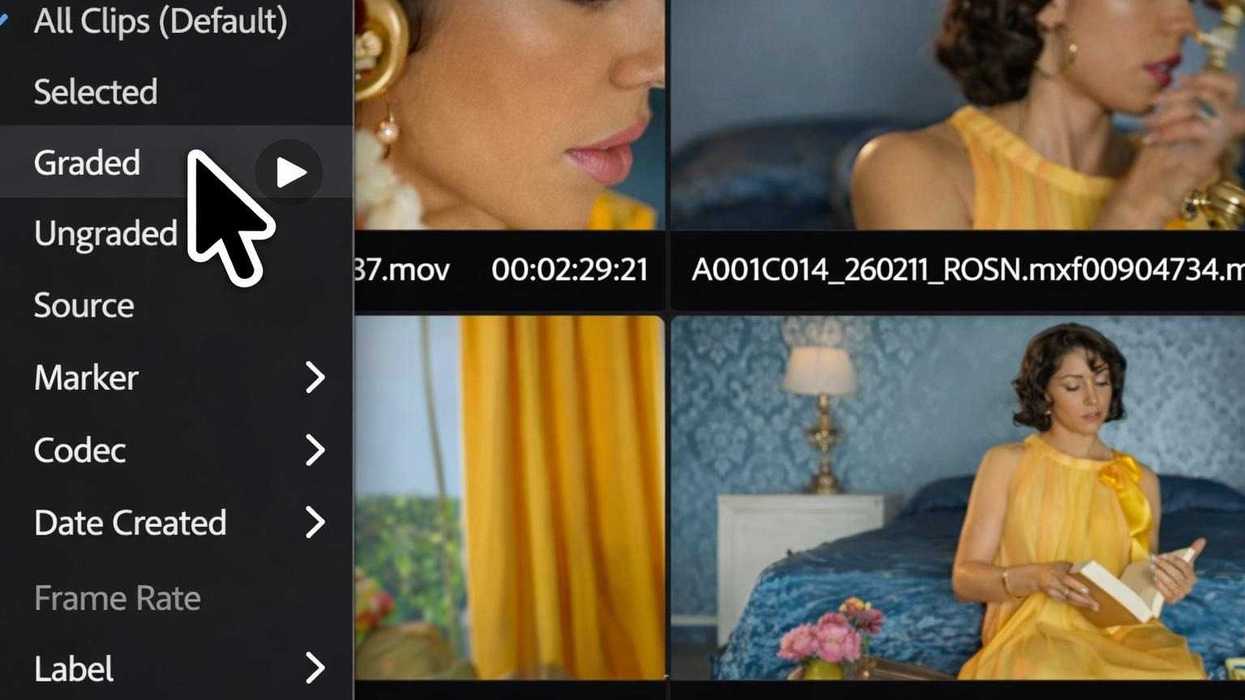
The first reaction most editors have when they enter Color Mode is disorientation. The timeline—the primary organizing structure you have relied on—is no longer the center of the experience. In its place is the Clip Grid. The immediate question is predictable: where did my timeline go, and how am I supposed to work without it? The answer is that nothing was removed. The timeline still exists, but it is no longer the most efficient structure for the type of work you are doing. Color decisions are not inherently linear. They are comparative, iterative, and dependent on relationships between shots that may be far apart in the sequence. The Clip Grid is built around that reality.
Instead of forcing you to scroll, zoom, and hunt through a timeline to find related shots, the Clip Grid lets you see, organize, and act on clips as a set. This is a shift from time-based navigation to attribute-based navigation. The difference is not cosmetic—it changes the speed and accuracy of how you work.
Grid vs. Row/Column Mode
The Clip Grid offers multiple ways to view your material, depending on the task at hand. Grid view is optimized for visual comparison. It presents clips as thumbnails, allowing you to quickly assess exposure, color balance, and continuity across a set of shots. When you are matching scenes or evaluating coverage, and since the thumbnails are color managed, the Clip Grid is as accurate as the monitor.
Row or column view shifts the emphasis from image comparison to structured inspection. Here, clips are presented with more visible metadata, making it easier to analyze technical attributes and organize material based on specific criteria. This mode is useful when you are diagnosing issues tied to camera formats, resolutions, or other production variables. Additionally, to maximize room in your workspace for a large color monitor, the Clip Grid can be oriented either vertically or horizontally, depending on what makes sense given your display’s size and resolution.
The key point is that you are not locked into a single representation. You can move between views depending on whether you need visual context or technical precision.
Filtering and Sorting
The Clip Grid becomes significantly more powerful once you start filtering and sorting. Instead of manually locating clips, you can isolate them based on attributes that actually matter for grading. You can filter by source clip to group all instances of a shot, by codec to isolate footage that may require different handling, or by label to quickly access editorial groupings. Resolution and timecode filtering allow you to identify mismatches or outliers that would otherwise require manual inspection.
Sorting extends this further. You can order clips in a way that reveals patterns—grouping by camera, arranging by source timecode, or a variety of different metadata fields and clip properties such as scene or date created. This is not just organizational convenience. It is a diagnostic tool. Patterns that are invisible in a timeline become obvious when clips are arranged by shared attributes.
This has a direct impact on consistency. Instead of reacting to issues shot by shot, you can proactively identify and address entire classes of problems. Filter and Sort enable you to use the Clip Grid as a flexible to-do list of what needs to be worked on next.
Metadata, Badges, and Hidden Clips
Each clip in the grid carries metadata that informs how you evaluate and process it. This includes both standard fields and visual indicators such as badges.
Badges surface critical information at a glance—whether a clip has been adjusted, grouped, or carries specific properties that affect grading decisions. Furthermore, you can customize what metadata is shown or hidden, enabling you to focus on what’s important for your particular program.
Hidden clips introduce another layer of control. Rather than deleting or ignoring material, you can remove it from the active view while keeping it accessible. This allows you to focus on the shots that matter for the current task without losing access to the full sequence.
The combination of metadata visibility and selective hiding reduces cognitive load. You are not scanning irrelevant material, and you are not relying on memory to track what has or has not been addressed.
Selection as a First-Class Operation
In a timeline, selection is constrained by position. In the Clip Grid, selection is driven by intent. You can select clips based on filters, metadata, or visual similarity, and then apply operations across that selection instantly. This is where the system begins to compound in value. Once you can reliably define a set of clips, every grading action becomes scalable. You are no longer making isolated adjustments—you are operating on groups that share meaningful characteristics.
This directly addresses one of the core inefficiencies of timeline-based grading: repetition. The Clip Grid reduces redundant work by making it trivial to act on multiple related clips at once. You can also use these capabilities to gather clips that make sense to group together for ongoing shared adjustment.
Why This Is Faster Than the Timeline
The timeline is optimized for editorial sequencing. It is effective for understanding order, rhythm, and structure. It is not optimized for comparative analysis or bulk operations across non-contiguous shots.
Color work requires both. When you rely on the timeline for grading, you are forced into a serial workflow. You move from clip to clip, often revisiting the same decisions multiple times as inconsistencies emerge. The cost is not just time—it is drift. The more passes you make, the more opportunity there is for the look to diverge.
The Clip Grid removes that constraint. By allowing you to see and act on clips as a set, it reduces the number of passes required to achieve consistency. You can identify mismatches earlier, apply corrections across groups, and maintain tighter control over the overall look. The timeline is still there when you need to evaluate pacing or context. But for the act of grading itself, the Clip Grid is the more efficient structure.
Reframing the Workflow
The adjustment required here is conceptual. If you treat the Clip Grid as a replacement for the timeline, it will feel disorienting. If you treat it as a system designed specifically for color decisions, the logic becomes clear. You are not losing the timeline. You are gaining a structure that aligns with how color work actually happens: through comparison, grouping, and iteration across sets of images.
Once that shift is internalized, the Clip Grid stops feeling unfamiliar and starts functioning as the primary tool for moving quickly and maintaining consistency across an entire sequence.