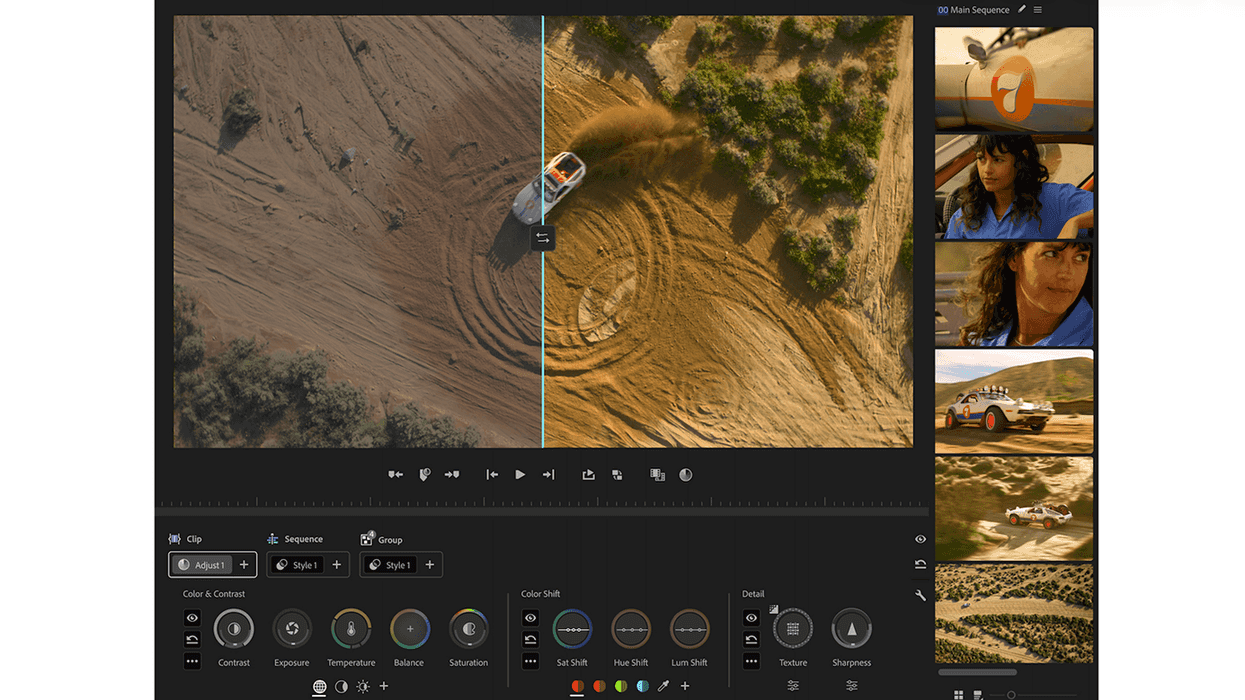
Whether you’re just getting into filmmaking or already making your own projects, you eventually run into the same moment. You’ve shot something you like. You’ve cut it into a sequence that works. And then you open the color tools in your NLE—and everything slows down. What felt intuitive while shooting and editing suddenly becomes technical. Sliders don’t behave the way you expect. Terms like curves or lift/gamma/gain feel disconnected from what you’re actually trying to do. Small changes can make the image worse instead of better.
That experience isn’t a reflection of your skill. It’s a reflection of how these tools were designed.
Why Color Has Always Felt Hard
Professional color tools weren’t built for the way editors work today. Most filmmakers are juggling everything themselves—cutting, designing graphics, and often handling color because there isn’t a dedicated colorist on the project.
The problem is that the color tools that are available today were designed for a very different context: specialists who spend all day grading, working in controlled environments, often with dedicated hardware and deep technical knowledge.
That history still shows up in the tools dedicated to the task. They work based on the assumption that you understand how color behaves mathematically. They expect you to remember how each control works, and they rely on you being willing to navigate complexity in exchange for precision.
But filmmaking today rarely looks like that. You might be shooting, editing, doing sound, and delivering your own work. You might touch color in bursts, not every day. You might be learning by experimenting rather than studying theory first. So when color feels harder than everything else in the process, it’s not because you’re missing something. It’s because the tools were built for a different kind of user.
The Moment Adobe Decided to Build Color Tools for Editors
The shift that led to Color Mode in Premiere (beta) didn’t begin as a feature update. It began with a specific person refusing to accept the premise that color tools are supposed to be designed for colorists.

Alexis Van Hurkman is a longtime colorist, trainer, and author who has worked on professional grading systems (including contributions to DaVinci Resolve’s HDR tools), written widely used color textbooks, and taught color workflows to working professionals for years. When he came into Adobe through the Frame.io acquisition, he wasn’t looking to iterate on Premiere’s color tools. In fact, he didn’t want to work on Lumetri at all. From his perspective, its limitations weren’t superficial—they were structural, tied to older assumptions about how color tools should behave.
That stance shaped the direction of everything that followed in Premiere. Alexis wasn’t trying to improve a system. He was looking for permission to ignore it.
In what he now describes as a “clandestine” meeting, he was asked by a Premiere Product Manager, Fergus Hammond, what he would build if he could design a color workflow designed for today's editors. He didn’t take the offer at face value, and he didn't think the question had any merit behind it. In large organizations, that level of freedom is typically narrowed, negotiated down, or quietly reversed. So instead of designing within the usual boundaries, he treated the creative brief as if those boundaries didn’t exist—built the version he actually believed in—and was prepared for it to be turned down.
Alexis' approach gave him the creative freedom to design something that’s unusual inside a mature product. Instead of asking how to extend Lumetri into something it should be, he asked a different question entirely: "If I was designing color today, with modern processing, modern color management, and no obligation to preserve legacy metaphors, what would it look like?" The system he designed rejected UI patterns inherited from decades-old hardware. It did not expose every control all at the same time. He created something with maximum flexibility and delivers the best result with the fewest mouse clicks.
He built a color experience that deliberately prioritizes learnability, speed, and workflow over tradition. Then he presented it to the Premiere team, expecting it to be turned down.
It wasn't.
Built for Editors—But Usable by Colorists
What followed was a multi-year effort to turn that philosophy into a real system: new tooling, new interaction models, and extensive user testing to validate whether the approach actually worked in practice. The end result wasn’t just a new interface. It was a different point of view about what color inside an editing tool should be. That origin explains something important about Color Mode: who it is actually for.
It’s not that colorists can’t use it. They can. Much of the underlying capability is still there, and experienced colorists can push it as far as they need. But it wasn’t designed for them first. It was designed for editors—and by extension, filmmakers—who need to get to a good result quickly.
Alexis has been explicit about this. The guiding principle for the entire system was not maximum control but learnability. The goal was to make something that someone could pick up quickly, use effectively, and come back to later without feeling like they had to relearn everything from scratch.
That changes how the tool behaves.

Instead of exposing every possible control up front, it emphasizes a smaller set of actions that do more. Instead of spreading functionality across multiple panels, it consolidates it into a workflow that lets you move faster. Instead of requiring you to understand the system before you can use it, it lets you start working and learn as you go.
The difference is subtle when you describe it, but obvious when you use it: you spend less time figuring out what to click and more time reacting to the image.
A Different Way of Thinking About Color
One of the hardest parts of learning color is that traditional tools force you to think in terms of the tool itself—curves, nodes, parameters—before you can think about the image.
Color Mode in Premiere (beta) flips that.
Under the hood, many of the same mathematical ideas are still there. As Alexis points out, a lot of what you’re doing is still effectively curves. You’re still shaping contrast, isolating ranges, and adjusting color relationships. But you’re not required to think about it that way.
Instead of asking, “Which control do I use?” the system pushes you toward a different question: “What part of the image do I want to change?”
That shift is important because it mirrors how you already make decisions when you look at an image. You don’t think in curves or parameters—you notice that the highlights feel too harsh, the skin tones feel off, or the shadows are too heavy. By letting you act on those observations directly, the tool aligns with your visual instincts instead of forcing you to translate them into technical steps first. Over time, that tight feedback loop—see, adjust, evaluate—helps you develop both speed and judgment.
Why This Matters for Filmmakers
For filmmakers—especially those still building experience—progress comes from repetition. You try something. You see what it does. You adjust. Over time, your taste improves. But that only works if the tool lets you move quickly enough to experiment. If every adjustment feels risky, or if you’re constantly second-guessing which control to use, you slow down. You experiment less. And learning stalls.
Color Mode is designed to reduce that friction.
Color Mode encourages you to push an image, pull it back, try a different approach, and keep moving. Instead of worrying about breaking something, you’re more likely to explore. That shift—from hesitation to experimentation—is where most real improvement happens.
The Tradeoff
There is a tradeoff. When a tool becomes easier to use, some of its complexity moves out of sight. That means there will be moments where you don’t fully understand why something behaves the way it does or where you don’t have the same level of direct control you might find in more traditional systems.
That's a fair trade for most filmmakers, especially at first. It's more important to be fast and clear than to have complete control. But it also means that as you grow, you might want to know what's going on under the surface.
Color Mode doesn’t remove that need. It just changes where you start.
What This Signals
Adobe’s decision to rebuild color from scratch reflects a broader shift in how creative tools are being designed. The assumption is no longer that users will adapt to the tool. The assumption is that the tool should adapt to how people actually work.
For filmmakers and aspiring filmmakers, that works in your favor.
It means you can spend less time navigating systems built for someone else and more time shaping your own work. It means you have more space to make creative decisions instead of technical ones—trying ideas, iterating quickly, and discovering looks that support your story rather than fighting the interface. It also means your time is spent on the work itself: choosing mood, guiding attention, and reinforcing emotion through color. Instead of managing a complex system, you can move faster, experiment more, and build confidence through doing.
Premiere Color Mode Article Series
This article is article number one in a series of articles on Color Mode in Premiere (beta). In the next article, we’ll make that difference more concrete by comparing Color Mode directly to Lumetri—what’s actually changed and why those changes matter once you’re inside the edit.
For more information on Color Mode in Premiere (beta), visit Adobe’s website for more information and download the beta through the Creative Cloud application.- Dive into Premiere Pro: Adobe's Obsession with Color ›
- Major Adobe Updates Are Here: Color Mode in Premiere, Frame.io Drive, and More AI Capabilities ›
- Premiere Pro Set to Become More Beginner-Friendly and Better for Color Management ›
- Inside Premiere’s Color Mode: Adobe’s Biggest Color Grading Overhaul in a Decade ›
- Color Mode in Premiere: Setting Up for Success ›