After wrapping up a week at Adobe MAX 2026 in Miami, it’s hard not to see creative design choices and the workflows that bring them to life in pretty much all aspects of media, advertisements, and, of course, television, film, and digital content online.
And while Adobe MAX, the company’s annual creativity conference, might focus on design and workflows for all types of creatives, the updates to Adobe’s flagship video editing platform were the biggest draw for us.
Looking specifically at what’s new and live in Premiere 27.0, which is available now, let’s explore everything you need to know about this latest version and its new color grading, AI tools, smarter audio, and fresh effects.
Adobe Premiere 27.0 is Here
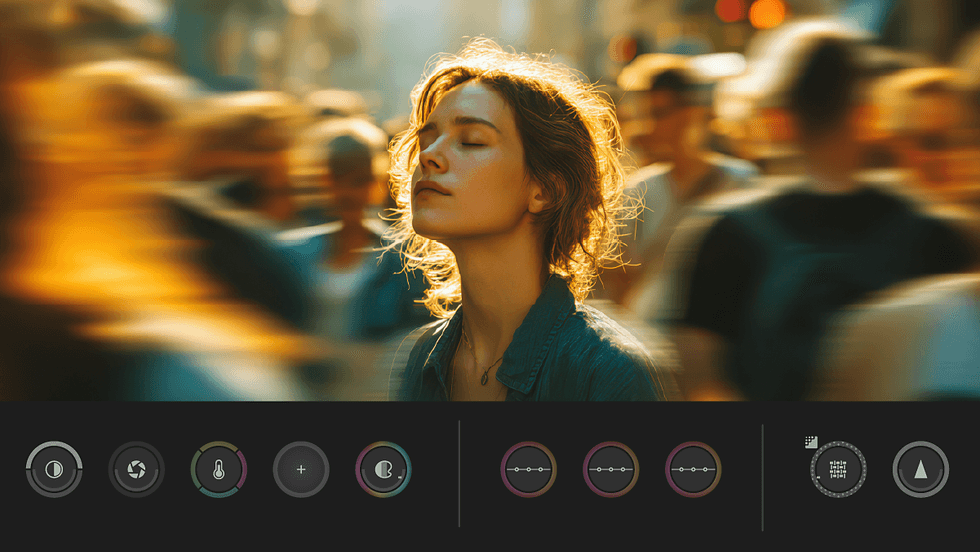
As we covered at NAB 2026 when we last checked out the latest updates for Adobe Premiere, the biggest news by far was the new Color Mode. We chatted in depth with Adobe’s Jason Druss at NAB 2026 to understand why and how the company is attempting to fully rethink how it provides color grading tools for video editors.
Following up with Druss and the Adobe team at MAX this year, we got some new insights into Color Mode, which takes another step forward in terms of usability and workflow tweaks that are squarely focused on providing high-end tools for those with real color chops, not just hybrid creatives.
We also got to check out some AI-powered audio tools that have made their way into Premiere after being demoed in other areas of the Creative Cloud. These were expected updates that are, believe it or not, quite powerful thanks to AI and could be quick ways to speed up your workflows even more.
Credit: Adobe
Highlights of Adobe Premiere 27.0
We’ll let you be the judge of what new updates and features might interest you most, and how you feel about Premiere up against its video-editing competition like DaVinci Resolve and Final Cut Pro. Here are some highlights of Adobe Premiere 27.0
- Move from edit to color without breaking your flow: Color Mode is a new color grading workspace in Premiere, built for editors and right next to your edit. Learn more about Color Mode ›
- Get clear, layered dialogue with Enhance Audio: Get improved controls and an updated experience when using Enhance Audio to improve the clarity and quality of dialogue. Learn how to apply Enhance Audio to clips ›
- Untangle overlapping dialogue automatically: Separate Crosstalk automatically detects and separates two overlapping speakers recorded on a single mixed audio track into individually routable timeline stems, powered by the Adobe Firefly audio service. Learn more about how to separate overlapping speakers ›
- Keep audio mixes balanced as you edit: Auto Ducking now updates keyframes automatically as you add, trim, or mute clips. No need to select Generate Keyframes after every edit. Learn how to automatically duck audio ›
- Find and preview the right effect faster
- The Effects panel now has thumbnail images and preview videos for all the video effects and transitions. Improved search makes it easier to find what you are looking for. Preview from source allows you to see how a video effect will look on your footage.
- Learn more about previewing and managing effects ›
- Native Support for NVIDIA RTX Spark on Windows on ARM: Added native support for Windows on ARM (ARM64) on PCs powered by the NVIDIA RTX Spark (N1X) chip. It also uses NVIDIA's TensorRT, which accelerates on-device AI features such as Object Mask, Enhance Speech, and Scene Edit Detection. Learn more about Windows on ARM ›
- Create more looks with eight new effects: Explore a new set of effects, including Bevel Alpha, Bevel & Emboss, Posterize, Radial Blur, and Zoom Blur for enhanced compositing, texture, and motion design. Learn more about the video effects in Premiere ›
- Adjust effects faster in the Properties panel: Video effects, audio effects, and masks now appear as easy-to-read cards in the Properties panel, a simpler alternative to the Effect Controls panel. Learn how to customize effects and masks ›
- Target colors precisely with HSL masking: HSL Masking isolates colors by hue, saturation, and luminance and works alongside other masks, so adjustments affect only the area you choose. It works well in Color Mode. Learn how to create masks using HSL and luminance ›
- Object Mask improvements: Create cleaner, more reliable Object Masks with improved tracking, smaller file sizes, and easier mask file management and recovery. Learn more about mask tracking tools ›
- Create the extra frames your transitions need: When a transition needs more frames than a clip has, Generative Extend can now create the missing frames for you. Learn more about Generative Extend ›
- See audio waveforms as you record: See audio waveforms drawn on the timeline in real time while you record with the Audio Track Mixer or Voice-Over. Learn how to record a voice-over on an audio track ›
- See audio metadata where you need it: iXML metadata can now be shown on audio clips in the timeline and in the Source Monitor. Learn how to configure Media preferences ›
- Enhanced Speed/Duration controls and audio stretching: Adjust clip speed and duration with a redesigned dialog featuring multiple audio stretching modes, high-quality processing, and pitch controls to preserve natural-sounding audio, without the need to round-trip to Audition. Learn how to adjust clip speed and duration ›

Credit: Adobe
More News and Info to Come
Obviously, there’s a lot more to explore from Adobe MAX 2026, as well as what’s new in Premiere and with the rest of the Creative Cloud. The biggest news we didn’t delve into here is, of course, the introduction of new AI workflows and a new AI Assistant panel in Premiere, which we’ll explore more next—so stay tuned.
For now, though, you can find more info on Adobe Premiere 27.0 on the company’s website here.
- Adobe MAX 2026: What’s New for Filmmakers and Video Editors ›
- Adobe MAX 2026: Firefly and Premiere mobile to Provide New Ways to Create and Edit Content ›
- Adobe Adds Even More AI-Powered Editing Tools and Upgrades to Premiere and After Effects ›
- Major Adobe Updates Are Here: Color Mode in Premiere, Frame.io Drive, and More AI Capabilities ›
- Adobe Unveils Photoshop Elements and Premiere Elements 2027 With New AI-Powered Capabilities ›