As the 2026 Sundance Film Festival kicks off, Adobe is starting things up as well. The company, which reports that 85% of the films at the festival were made using Adobe Creative Cloud, remains a stalwart presence at the fest and within the filmmaking community overall.
Along with its editing stories from the fest, Adobe is kicking things off with some major announcements for new tools and upgrades for Premiere and After Effects. Here’s what you need to know.
Adobe Premiere Updates
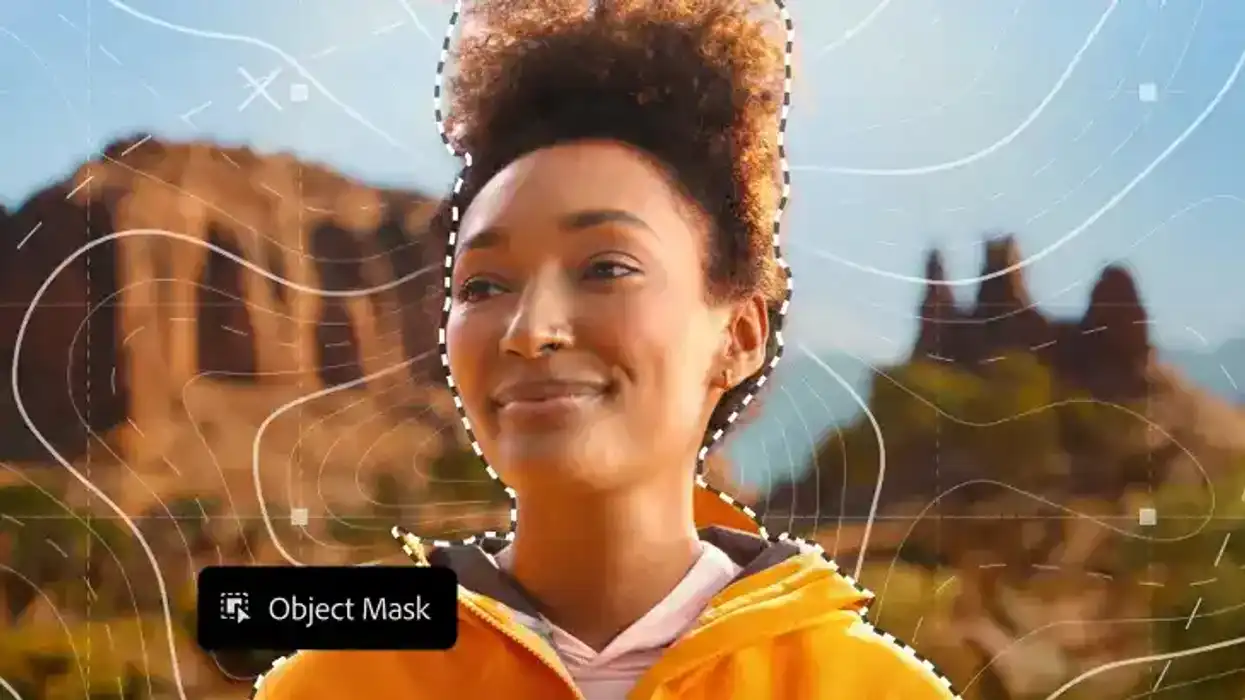
The big news for Adobe Premiere (no longer stylized as Premiere Pro, fyi) is a new AI-powered Object Mask tool which aims to make it easier than ever to create, refine, and track precise masks of complex moving subjects with a simple hover and click, while redesigned shape masks that track up to 20× faster—a new feature that will help turn masking into a more fun, and powerful tool.
Adobe is continuing to double down on its generative AI toolset, Firefly, and focus on Firefly Boards as a way for filmmakers to storyboard, fill b-roll gaps, and explore new concepts collaboratively in a more streamlined import feature with Premiere.
The other big news here is that the new Frame.io V4 panel is here and can further help users keep their edits together by bringing in comments, media, and versioning. Users can also ingest assets, share cuts, and sync notes now without ever leaving Premiere.

Credit: Adobe
Adobe After Effects Updates
As for After Effects, Adobe reports that vector workflows will now be smoother than ever before, as users will now be able to import SVG files, a common file type used by graphic designers in Adobe Illustrator, as native shape layers and start animating with full vector fidelity.
Users will also now be able to design in 3D with parametric meshes that they can create from scratch right inside of After Effects. User will further be able to build and customize cubes, spheres, cylinders, cones, toris, and planes.
There are new updates for Substance 3D materials, and users can now access and apply them to both native meshes and imported models to add depth and realism to their models in just a few clicks.

Credit: Adobe
Check Out the Updates
As is always the case with new updates, if you’re an Adobe Creative Cloud subscriber, you can update your apps and check out these new tools and features right away. You can find more info on Adobe’s website here, too.
- Adobe Unveils Even More AI Features Coming to Premiere Pro and After Effects ›
- Adobe Premiere Pro and After Effects Now Supports ProRes RAW ›
- Premiere Pro Improves Warp Stabilizer, Adds Captions Workflow Tool in Latest Update ›
- Adobe After Effects Just Got Its Biggest Performance Boost Ever ›
- Finding the Best Workflow Between Premiere Pro and After Effects ›
- Is Adobe CC Now an Affordable VFX Powerhouse? Updates to Premiere Pro, After Effects, and 3D Modeling ›
- From Music Videos to Feature Films: Editing Lessons That Translate ›
- What’s New in After Effects? Here Are All of the Latest Motion Design, Compositing, and Animation Updates ›
- Major Adobe Updates Are Here: Color Mode in Premiere, Frame.io Drive, and More AI Capabilities ›
- Firefly Boards Inside Photoshop and Lightroom? Adobe Might Be Changing Its Workflow Game ›
- It’s Not Just AI: Adobe Announces Updates and New Features for Substance 3D ›
- Oh Hush! Adobe Introduces a Global Audio Mute Feature to Premiere Plus Other Updates ›
- Adobe Announces Major Substance 3D Updates Including OpenPBR Support Across Entire Ecosystem ›
- Adobe Unveils Photoshop Elements and Premiere Elements 2027 With New AI-Powered Capabilities | No Film School ›