This Voice-Controlled Camera App Can Record Portrait and Landscape Video For You at the Same Time
Shootsolo, a voice-controlled camera app and AI filming assistant for solo filmmakers and content creators, has just expanded its already long list of features.
Shootsolo Video Camera App
You might have to look around a bit to find them, but so many new filmmaking apps can give unique boosts to your filmmaking and video content workflows.
A new one that came across our desk here is one called Shootsolo, a voice-controlled video camera app and AI filming assistant that just released a 2.0 version that adds portrait and landscape video recording at the same time, a built-in teleprompter, virtual studio lights, and background effects.
It has also dropped its previous credit system and is now, at least claims to be, completely free to download and use. Let’s quickly check it out.
The Shootsolo Video Camera App
Available on iOS and Android and verified in each app store, the Shootsolo video camera app was developed to solve some of the main problems solo filmmakers and creators face, since self-recording can be tricky, laborious, and frustrating.
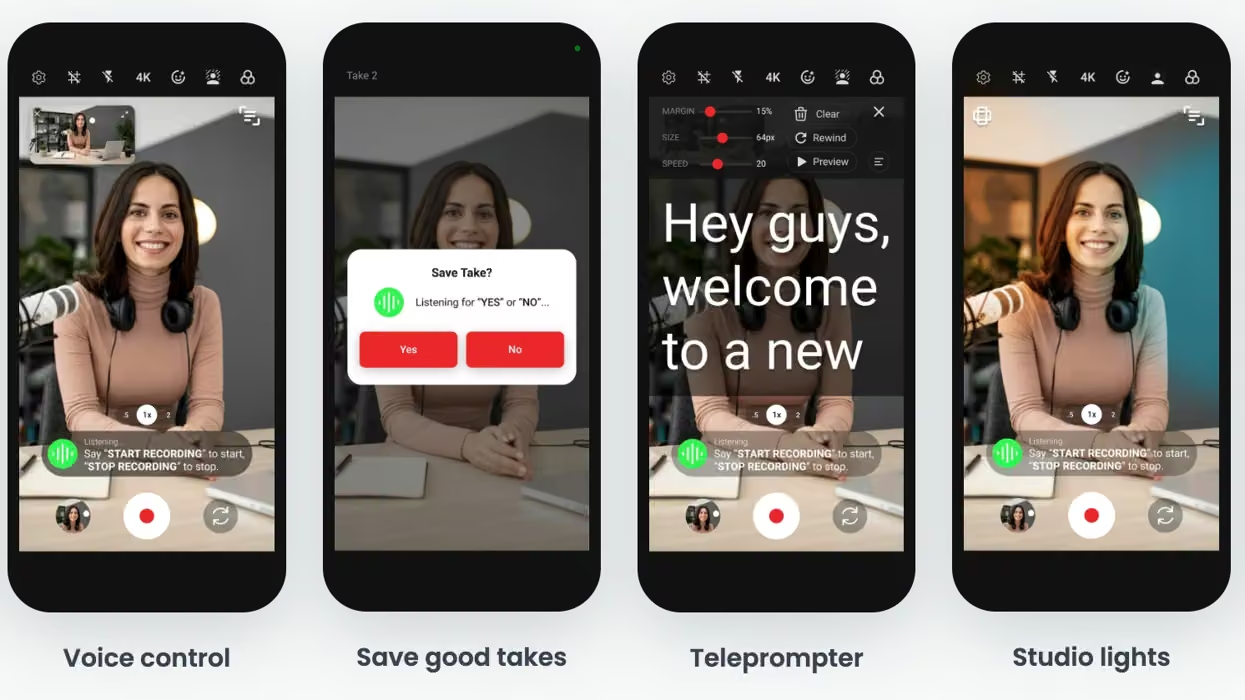
Shootsolo’s main feature is its voice-controlled interface, which lets shooters say “start recording” or “stop recording” to control the camera without touching it. After each take, the app asks whether to save or discard the clip, so you keep only the best footage.
This new 2.0 update turns the app from a voice-controlled recording app into a more complete video camera app by adding portrait and landscape recording, so creators don’t have to record each separately.
Full Shootsolo 2.0 Update
Here’s a full breakdown of all the new features added and now included in this Shootsolo app:
- Portrait + Landscape at Once: Record a single take and save it in both portrait and landscape at the same time. Film once and post to Reels, TikTok, Shorts, and YouTube with no re-filming and no cropping in an editor.
- Built-In Teleprompter: Read a script on screen while recording, with adjustable scroll speed, text size, and margins, so creators stay on message and keep eye contact with the lens.
- Virtual Studio Lights: Add adjustable spotlights and colored RGB lights to the shot, then reposition them, recolor them, and change their intensity. No physical lighting kit is needed.
- Background Effects and Filters: Background blur, green screen and grey screen, a skin smoothing filter, and brightness, contrast and exposure controls. What creators see on screen is exactly what is recorded.
- New Voice Commands: “Pause Recording” and “Resume Recording” to hold and continue a take, and “Play Video” and “Close Video” to review it in the new built-in player. The start and stop keywords can be switched to other presets, such as “And Action” and “And Cut”.
- Pro Tools: Recording in up to 4K, Bluetooth shutter remote support, external microphone support, a composition grid and a safe-zone overlay, and an optional prompt to rename each clip right after recording.
- Free and Unlimited: The credits system is gone. There are no ads, no watermark, and no subscription, and the app works fully offline.
Price and Availability
If you’re curious to check out this upstart new app yourself, Shootsolo 2.0 is out and available now as a free download on the App Store (iOS) and Google Play (Android).
- This iPhone Camera App is Another Solid Pro Shooting Option for Mobile Filmmakers ›
- Learn How to Shoot a Scene with a Single Camera ›
- Further Unlock the Uniqueness of the Fujifilm X half Camera With This Companion App ›
- You Don't Need to Move the Camera to Get a Great Shot ›
- This iPhone App Promises to Unlock Open Gate or 4K With Real-Time RAW Processing ›