This iPhone App Promises to Unlock Open Gate or 4K With Real-Time RAW Processing
A look at Log Cam: Open Gate by RAW Cam, a professional video camera app built for filmmakers who might want to try unlocking more control for their iPhones.
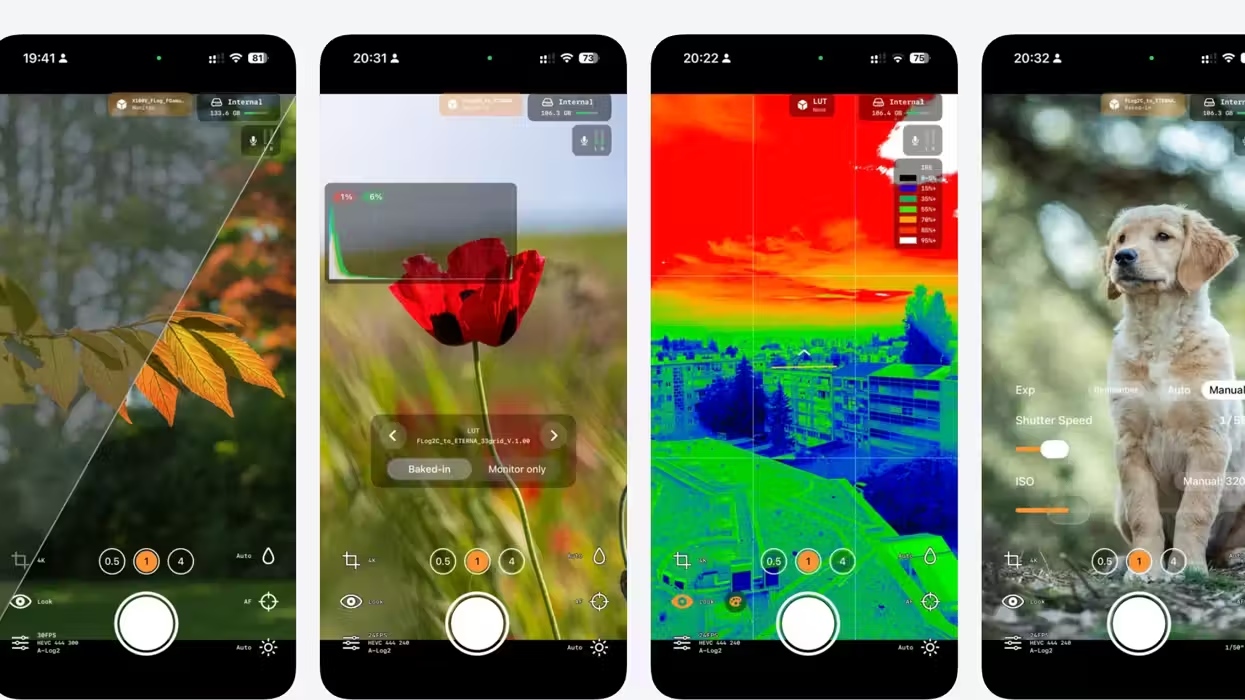
Log Cam: Open Gate by RAW Cam
Who doesn’t want to shoot Open Gate these days? Open Gate is basically the new 4K in terms of buzzwords, which everyone throws around for how they’d like to shoot and record footage. And that’s not a knock, as these formats are buzzy for a reason.
Shooting Open Gate can be hugely beneficial to filmmakers and videographers looking for a specific look and style of coverage that best suits their projects. And that’s what this camera app aims to provide for iPhone filmmakers, as the Log Cam app promises to let shooters record in Open Gate or 4K with real-time RAW processing.
The app also offers access to industry-standard Log profiles, LUTs, zebras, false color, and pro exposure tools. If you’re curious, here’s what you need to know.
Log Cam: Open Gate by RAW Cam
So, as far as camera apps go, this is another solid one to consider alongside others we’ve covered in the past, as well as some mainstays like Blackmagic Camera for iOS or Android. Those are some top options, but it’s nice to check out others, as this Log Cam app aims to give shooters the
This cinematic log video camera app further aims to give iPhone shooters access to the image pipeline tools they’d normally expect from dedicated cinema cameras, including all the common color spaces and Log gamma curves used in the industry.
The promise here is that you’ll be able to capture Open Gate or 4K video with real-time RAW-frame debayering and processing directly on your device. Shooters will be able to further choose from ProRes, 10-bit HEVC 4:4:4 or 4:2:0 recording, with HEVC bitrates also available up to 300 Mbps.
Price and Availability
Alongside the Open Gate and 4K shooting, the app offers a nice mix of LUTs and profiles, which users can use for monitoring only or bake directly into their footage. The app also lets you take control with a pretty insane list of features, which you can check out below.
- Open Gate and 4K recording
- Prores or 10-bit HEVC 4:4:4 or 10-bit HEVC 4:2:0 (bitrate up to 300Mbps)
- Industry standard Log gamma curves
- Frame rates up to 30fps
- LUT support (baked-in or monitoring only) -> put them in the _LUTs folder in the Files app
- Anamorphic Desqueeze
- Gyroflow GCSV support
- Manual ISO/Shutter or Auto with Lock at start option
- Shutter-priority mode
- Manual Focus (only before recording)
- Manual White balance or Auto with Lock at start option
- Vignette Correction
- Noise reduction
- Recording to external or internal storage
- External microphone support
- Horizon Indicator
- 180-degree rotation for DoF adapters
- Optical stabilization
- 3x3 Grid
The app is also available via a one-time purchase as well as with a 10-day trial. If you’d like to find out more info, you can check out the app on the Apple App Store here.
- Is 7K Video and 3:2 Open Gate Recording Enough to Make the New Canon R6 Mark III Stand Out? ›
- Here’s How You Can Trick the iPhone 17 Pro Into Recording Internal ProRes RAW Open Gate ›
- What Is Open Gate and Why Should You Consider Using It for Your Video Productions? ›
- Open the Gates! Here’s a Full Guide to Open Gate Video Recording With Your Favorite LUMIX Cameras ›
- Advanced Open Gate Recording With Apple Log Comes to iPhones With the Latest Blackmagic Camera App Update ›
- Rian Johnson and Steve Yedlin Just Dropped an iPhone Camera App—Here’s Why Filmmakers Should Care | No Film School ›