Announced at InterBEE 2025, Atomos has revealed that the company is rolling out some pretty significant firmware updates to its Ninja TX GO and Ninja TX. These CFexpress-based monitor-recorders are getting new integrated camera control features, which should further help them prove to be a nice option for shooters looking for flexibility and precision on set.
Let’s take a look at this new firmware update and what it aims to offer with its camera control features.
Atomos Ninja TX Series Firmware Update

Credit: Atomos
Introduced by Atomos for the company’s Shinobi II and Shinobi 7 RX models, these camera control features are proving to be quite popular as a way to offer more control functions and options for those who might be struggling with their camera’s tiny on-body controls and menus.
“The camera control functionality introduced on our Shinobi II and Shinobi 7 RX monitors has been hugely popular, and our engineering team has made it an even better experience on the new Ninja TX GO and Ninja TX monitor-recorders. The superior Ninja TX series onboard computer processing and Linux operating system give us the power to innovate faster and deliver more features to creators. This is a free update that makes it easier than ever to adjust camera settings, start shooting, and stay focused on the story, not the gear.” — Peter Barber, Atomos CEO.Atomos’ latest monitor recorders incorporate USB-C ports that help to enable these camera control features on supported cameras, which include brands like Canon, Fujifilm, Nikon, Panasonic, Sony, Z CAM, and others.
Easier Key Camera Functions

Credit: Atomos
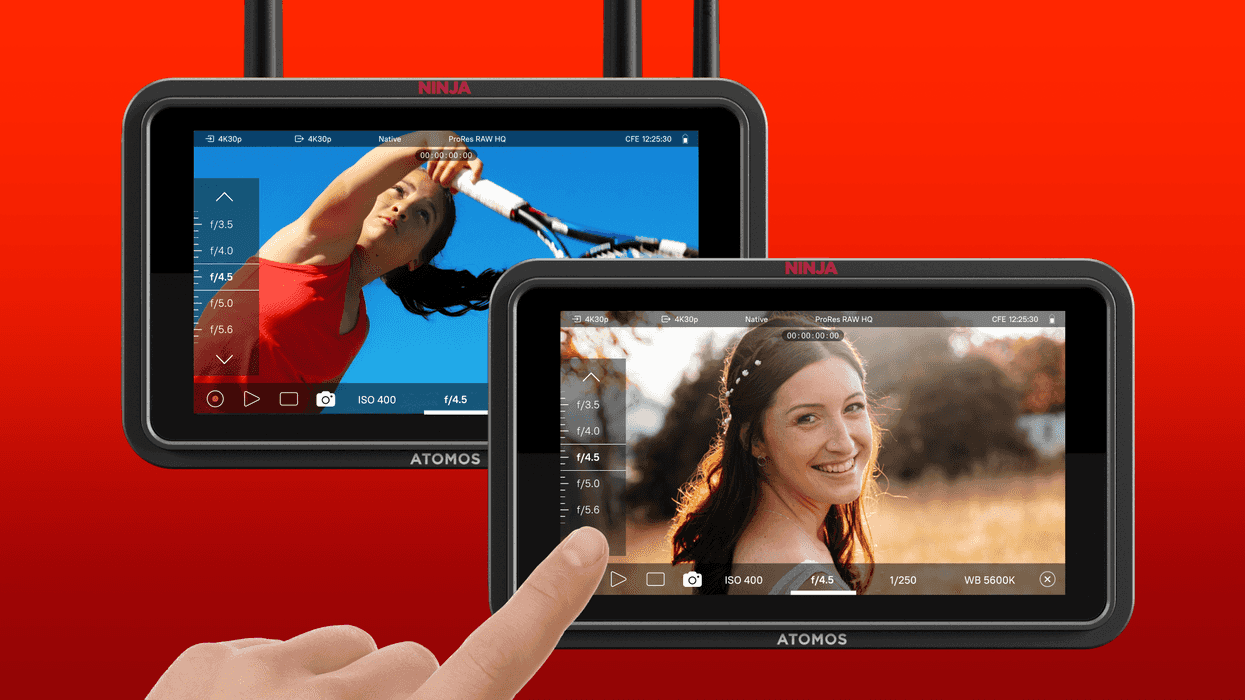
Some of the key camera functions set to be easily managed from the much larger touchscreen monitor interface will include:
- Start and stop recording without reaching for the camera.
- Change essential settings (ISO, shutter, white balance)
- Monitor and adjust from a more comfortable position (for example, when the camera is mounted in a tight spot)
These functions should be quite accessible and easy to use when available on the 5-inch, 1500-nit HDR touchscreens that the Ninja TX GO and Ninja TX offer. Other built-in features will include pro tools like EL Zone, waveform, vectorscope, focus peaking, and more.
Price and Availability
This latest firmware update (version 12.2.0) is available now as a free-of-charge, over-the-air update for both Ninja TX GO and Ninja TX. You can find more info on Atomos’ website here.
- Atomos to Support ProRes RAW on Panasonic LUMIX S5 ›
- Atomos' Ninja V Firmware Update Gives Legs to Select Legacy Platforms ›
- Atomos Ninja V Firmware Update Expands Z CAM Camera Control ›
- The AtomOS 3.0 Firmware Update is in the Wild, Atomos Shows off the New Features ›
- Ninja TX GO: Atomos’ Feature-Packed HDMI Monitor/Recorder for Modern Creators ›
- Atomos Totally Reengineers Its Ninja Monitor Line With New Ninja TX Monitor-Recorder ›
- Here’s How You Can Unlock ProRes RAW Recording for Your Canon R6 Mark III Cameras ›
- Atomos Gets its AtomOS Ready for the Latest Canon, Sony, and Leica Cameras With the Latest Update ›
- The Atomos Shinobi 7 II is Another Bright, High-Res Monitor For Your Cinema Workflows | No Film School ›