Get Support for Syncing Clips From Remote Cameras With Blackmagic Camera 3.0 Update
The latest update to the popular Blackmagic Camera app is here for iOS and Android, and it’s set to add some helpful new support features and improvements.
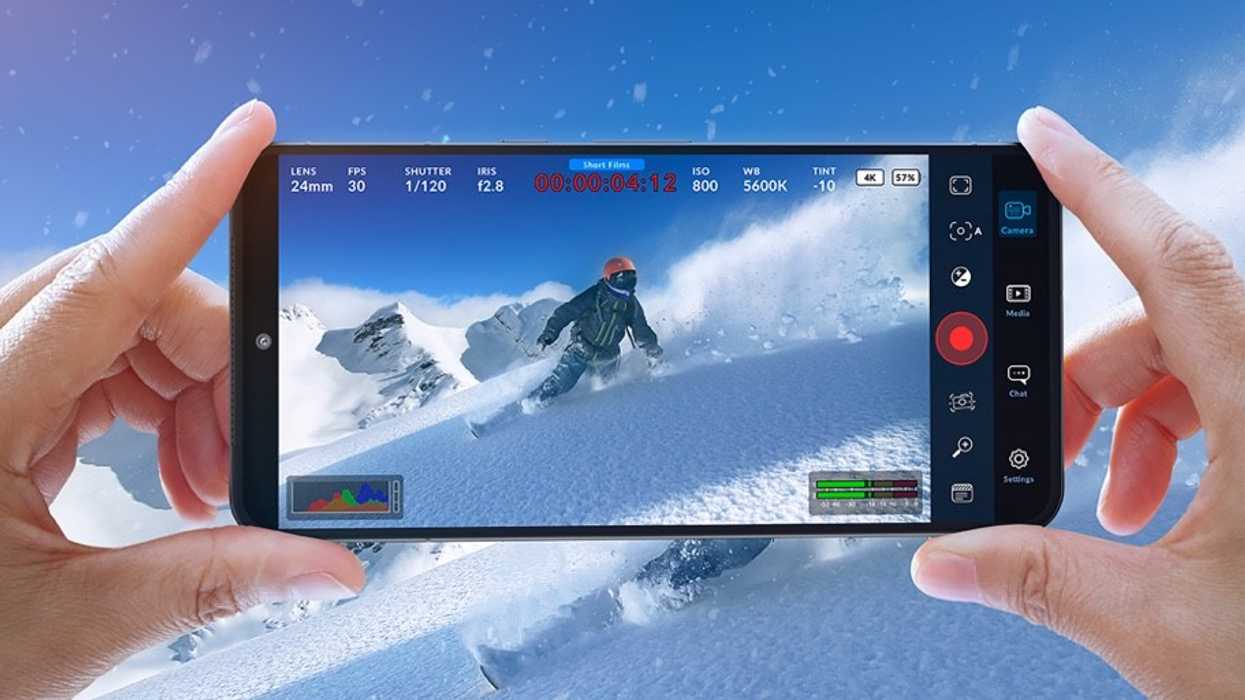
Blackmagic Camera 3.0
While the iOS and Android versions of Blackmagic Camera were released at different times, it seems like Blackmagic Design has finally been able to sync up the development of both versions to be on the same timeline.
This new version 3.0 update for Blackmagic Camera is for both versions, and it’s set to be a pretty significant one. If you’re looking to get support syncing clips from remote cameras to the controller, or if you’d like to try out some fun new quick tap controls, then you’ll want to grab this update today.
Here’s how to get started.
Blackmagic Camera 3.0 Updates
As mentioned above, the big news here is support for remote syncing clips from phone to controller. This should be quite helpful for those managing remote cameras and trying to coordinate recording between different devices.
The Blackmagic Camera app is also adding new quick tap access to presets, slate, and camera controls, as well as three programmable function buttons. All of these should certainly help improve workflows and speed up your productions.
Here’s the full list of everything new coming to Blackmagic Camera 3.0:
- Support for remote syncing clips from phone to controller.
- Reorganized navigation toolbar and ordering.
- Tap left for quick access to presets, slate and camera controls.
- Tap right for quick access to three programmable functions.
- Single lens and zoom control with additional dolly zoom options.
- FPS controls now include off speed and time lapse options.
- New camera light controls under exposure and focus.
- Histograms can now be expanded to fill preview.
- Built in LUT support for Apple Log, Rec.709, Rec.2020 and P3 D65.
- New HUD controls to switch LUTs and record with LUTs.
- Support for recording in open gate resolution.
- New 2.0 anamorphic desqueeze option.
- Support for auto exposure controls in auto mode.
- General performance and stability improvements.
As always, you can download and install the latest version of Blackmagic Camera for free by following the links on Blackmagic Design’s website here.
- How to Get Started With Blackmagic’s iOS Camera App ›
- Here’s How the Blackmagic Camera ProDock Can Turn the New iPhone 17 Pro into an Actual Pro Camera ›
- Blackmagic Camera App Adds 17K URSA Cine 65 and Remote Control for Cine Models ›
- You Can Now Record on iPhone 16 Series with Blackmagic Camera iOS Update 2.1 ›
- Blackmagic Camera for iOS 2.1.1 Update Addresses Colorspace and White Balance Issues ›
- What Are the Best Blackmagic Camera App Settings for iPhone 15 Pro Apple Log? ›
- None ›
- You Can Now Live Stream to YouTube, Twitch & Vimeo Directly from the Blackmagic Camera App | No Film School ›
- Blackmagic Camera for iOS Gets More Apple Watch Controls and Other New Features ›