Lost in all of the hustle and bustle of the last few weeks, which saw some major cameras introduced to coincide with IBC 2025 in Amsterdam, Adobe rolled out some pretty significant updates to its flagship NLE as well.
Of course, the big news to many might have been the news of Adobe FireFly adding support for Ray3, Luma AI’s newest video model (and the first to support native HDR). This update, while significant and also while offering generative AI video, wasn’t quite all the news, though.
Let’s take a look at everything new that’s come to Adobe Premiere Pro with the latest 25.5 update, including some fun transitions and new elements to explore.
Adobe Premiere Pro 25.5 Update
The crux of this new Premiere Pro 25.5 update really has to do with taking your transitions to the next level. Premiere Pro has gotten a major boost with new motion capabilities, huge updates for audio editing and timeline playback, and many additional improvements for general workflow flexibility.
All of these 90 new, modern effects, transitions, and animations are included in your plans, and they’re all GPU-accelerated, which means they’re able to play back in real time as soon as you drag and drop. And they’ll keep being able to play back in real time, no matter how many tweaks you make.
The transitions are meant to redefine your favorite classic transitions, too, with new dissolves, blurs, and wipes to explore, which are meant to look richer and smoother. There are also new rougher transitions with attitude, like earthquake, glitch, distortion, VHS damage, and chaos transitions.
Color Grading Upgrades
For color grading in Premiere Pro, there’s a new library of effects to help you take your visuals to that next level faster than before with a new collection featuring a range of glows, blurs, and echoes, which can help to add photorealistic bokeh, volumetric rays, glowing halation, and dazzling glints to your clips.
Users can also easily apply vignettes that warp to any shape you might want, as well as independently shift red, green, and blue channels to color correct for fluorescent lighting.
Premiere Pro also has curve editors, color pickers, chromatic aberration, custom blend modes, and everything else you might need to simply drag, drop, and animate.
Snappier timeline editing
A Snappier Timeline for Smoother Editing
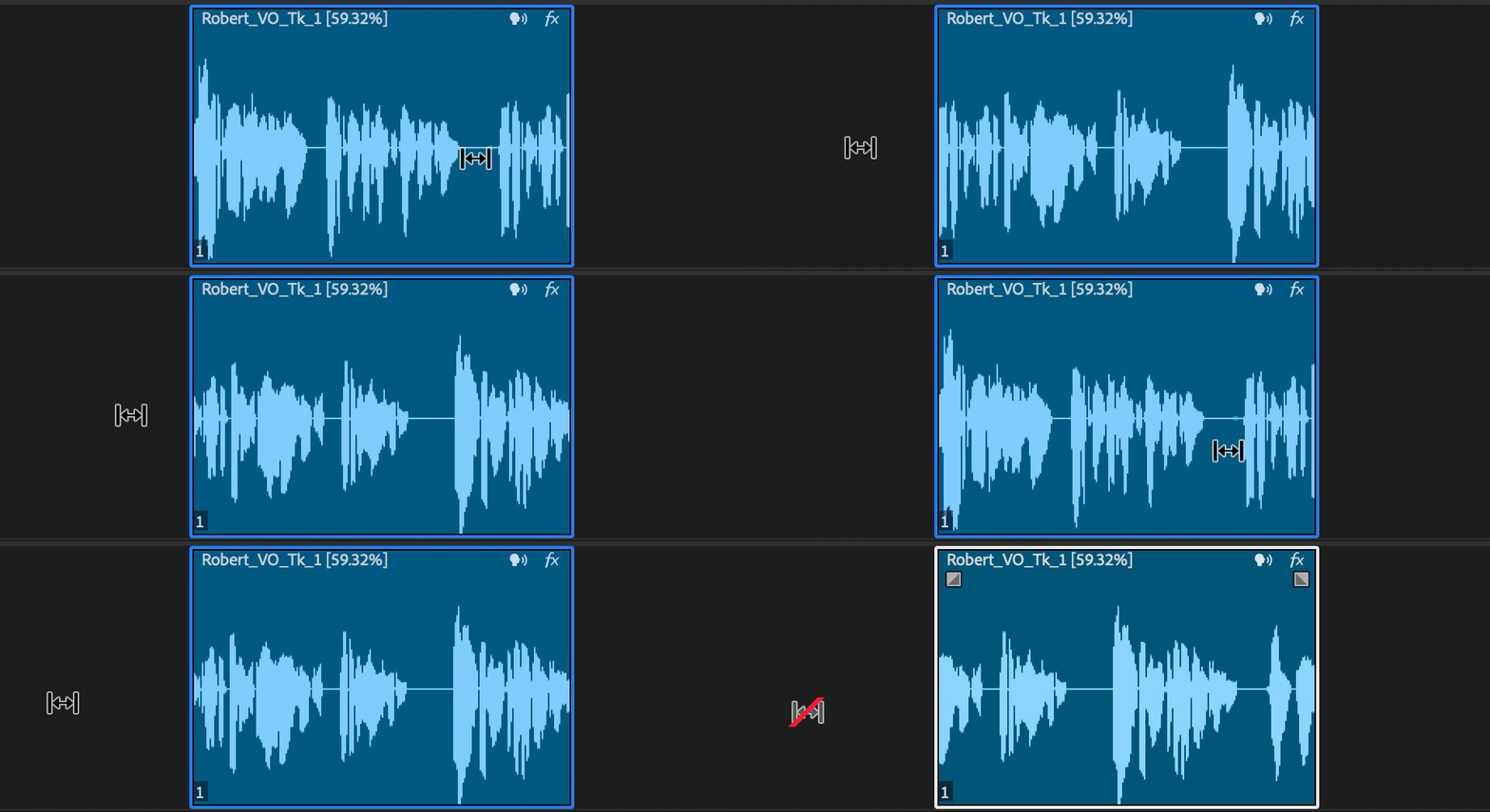
The other big news for Premiere Pro 25.5 is that audio waveforms will now remain visible when dragging a clip or performing common edit tasks, like ripple/roll edits or rate stretch.
Also, keyframes and markers will now be displayed alongside the waveform while dragging a clip, too, which should help editors maintain sync with key audio or visual elements.
As for format support and playback, Premiere Pro 25.5 gets smoother, too, with the following updates:
- New hardware acceleration of 10-bit 4:2:2 media in both H.264 and HEVC codecs on NVIDIA Blackwell GPUs provides great performance for formats that combine small file size and great quality.
- Hardware acceleration of Canon Cinema RAW Light makes for smoother playback and up to 10x faster export.
- New support for ARRIRAW HDE (High Density Encoding) enables playback of ARRIRAW that is 60 percent of the original file size.
If you’re curious to find out more about everything new in Premiere Pro 25.5, or to try out Premiere Pro for the first time, you can find out more on Adobe’s website here
.
- Post Directly to TikTok From Premiere Pro with Adobe Update 24.2 ›
- Adobe Premiere Pro 14.8 Updates RED R3D Workflows ›
- Premiere Pro Improves Warp Stabilizer, Adds Captions Workflow Tool in Latest Update ›
- Premiere Pro Gets New AI-Powered Search Tools and Other Improvements with 25.2 Update ›
- Premiere Pro Set to Become More Beginner-Friendly and Better for Color Management ›
- 28 New Features in Premiere Pro's Latest Update ›
- Adobe Unveils Photoshop Elements and Premiere Elements 2027 With New AI-Powered Capabilities | No Film School ›